Эта тема была архивирована.
Если вам нужна помощь, задайте новый вопрос.

Архивировано
compact folders

I recently downloaded Thunderbird. Due to comcast transfer of email to yahoo, I now have a yahoo account with a comcast email address. Using the export.mail.imap.yahoo.com incoming server, I was able to get all my mail into Thunderbird. At some point, I was asked to compact my folders. I replied yes. After that there were only 2000 messages in my inbox. To recover, I had to change my settings for my email address to an incorrect one and then back to the correct address. That started the rather lengthy import process again. My inbox is 3GB. What went wrong and how do I avoid this from happening again?
I recently downloaded Thunderbird. Due to comcast transfer of email to yahoo, I now have a yahoo account with a comcast email address. Using the export.mail.imap.yahoo.com incoming server, I was able to get all my mail into Thunderbird. At some point, I was asked to compact my folders. I replied yes. After that there were only 2000 messages in my inbox. To recover, I had to change my settings for my email address to an incorrect one and then back to the correct address. That started the rather lengthy import process again. My inbox is 3GB. What went wrong and how do I avoid this from happening again?
Все ответы (1)

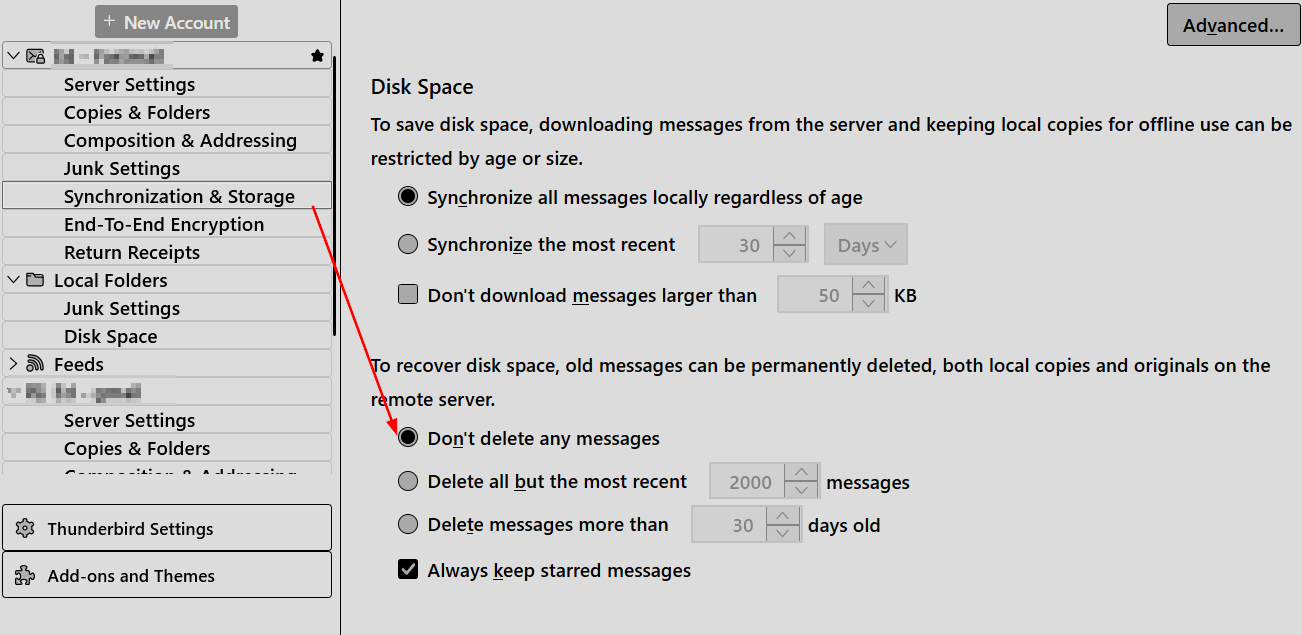
Go to TB menu > Account Settings > account > Synchronization & Storage > Disk Space > click 'Don't delete any messages'