


Windows 10 reached EOS (end of support) on October 14, 2025. For more information, see this article.

Поиск в поддержке

Избегайте мошенников, выдающих себя за службу поддержки. Мы никогда не попросим вас позвонить, отправить текстовое сообщение или поделиться личной информацией. Сообщайте о подозрительной активности, используя функцию «Пожаловаться».

Подробнее

Thunderbird is corrupt on my MacBook Pro

  • 2 ответа
  • 0 имеют эту проблему
  • 12 просмотров
  • Последний ответ от Wayne Mery

дополнительные действия

Today when I logged onto my MacBook I found that my Thunderbird desktop application is corrupt. When I attempt to open it states "You can’t open the application “Thunderbird” because it may be damaged or incomplete." Screen shots included.

I last used TB with no issues on Oct 27th.

I have over 20 years of TB emails that I do not want to loose.

I have backed up my profiles folders (there are 3) from >Go>Library>Thunderbird>Profiles

My first question is that I thought there were multiple locations of profiles. One for local. But I can only find the above profile.

My second question is how to I go about re-installing? Should I remove the corrupt application first and and then reinstall? What steps should I take?

Thank you!
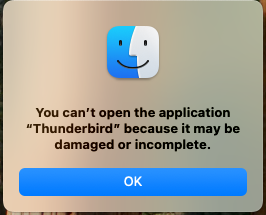
Today when I logged onto my MacBook I found that my Thunderbird desktop application is corrupt. When I attempt to open it states "You can’t open the application “Thunderbird” because it may be damaged or incomplete." Screen shots included. I last used TB with no issues on Oct 27th. I have over 20 years of TB emails that I do not want to loose. I have backed up my profiles folders (there are 3) from >Go>Library>Thunderbird>Profiles My first question is that I thought there were multiple locations of profiles. One for local. But I can only find the above profile. My second question is how to I go about re-installing? Should I remove the corrupt application first and and then reinstall? What steps should I take? Thank you!
Приложенные скриншоты

Выбранное решение

Remove the corrupt application and replace it with a new copy from https://www.thunderbird.net/en-US/desktop/

Прочитайте этот ответ в контексте 👍 0

Все ответы (2)

дополнительные действия

Выбранное решение

Remove the corrupt application and replace it with a new copy from https://www.thunderbird.net/en-US/desktop/

дополнительные действия

CAUTION: 'If you have add-ons installed (extensions) ... take notice of which version you have installed. If it is 140.something ESR, then you want to download https://www.thunderbird.net/download/esr/

Задать вопрос

Для ответа на сообщения вы должны войти в свою учётную запись. Пожалуйста, задайте новый вопрос, если у вас ещё нет учётной записи.