


messages bounced for being over quota

Just now, three messages were bounced from my Thunderbird inbox. The error message given was: A message was sent to you that was returned to the sender(bounced) because it would have caused your mailbox quota to be exceeded.
The following is the reason that the message was over quota:
      Quota Type: bytes in the mailbox
 Quota Available: 894.2KB
     Total Quota: 5000000.0KB
There's very little in my Inbox, but there was a lot in trash and a bunch of sub-folders I didn't need anymore, so I deleted just about everything. The little indicator at the bottom right of the screen was still red, indicating excessive messages, so I closed Thunderbird and reopened it. The red indicator is still lit up like a Christmas tree, even though I've deleted hundreds of emails from all folders, but I resent the messages (these were between my Spectrum account and my Gmail account), and they still bounced. I then rewrote the emails, reducing the number/size of attachments, but they again bounced. Other emails from outside senders are coming through just fine. I also receive my gmail account via Thunderbird and it's behaving perfectly. It's just my Spectrum email account that's acting up, although as I said, email from outside senders are coming through without a problem.
I'm doing this on my desktop, Windows 10, current Thunderbird version. I didn't go to webmail to delete any of this. I don't understand why the indicator says I'm at 99% of my quota after so many deletions.
Any and all suggestions cheerfully received!!
Выбранное решение
Yes, Ed, the status bar is blissfully empty now. Thanks so much for your help!
Прочитайте этот ответ в контексте 👍 0Все ответы (6)

Deleted messages don't really go away until you compact.
TB Menu Bar > File > Compact Folders If you don't see the menu bar on top, press the ALT key.
It might take a while.
Thank you, Ed! I did as you suggested (and I did have to press Alt to get the menu bar). When I clicked 'Compact,' the menu bar disappeared. Is that normal? Does it mean it'll get around to compacting at some point?
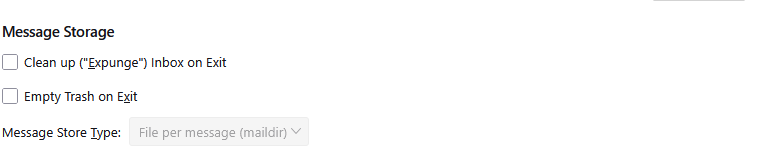
Compacting does explicitly expunge messages on the server as a part of the process, but simply setting the option in account settings >server setting to expunge the inbox on exit and actually restarting Thunderbird on a fairly regular basis clears cup most of the issues that would be occuring here. It is a good practice if you have limited server storage.
Thanks, Matt. That's something I definitely don't do, but I'll train myself to do that!
RoseQueen said
Thank you, Ed! I did as you suggested (and I did have to press Alt to get the menu bar). When I clicked 'Compact,' the menu bar disappeared. Is that normal? Does it mean it'll get around to compacting at some point?
The menu always goes away. Did you notice anything in the status bar at the bottom? Surely it is done by now.
Выбранное решение
Yes, Ed, the status bar is blissfully empty now. Thanks so much for your help!