


How to stop Mozilla ESR alerts

Hi, how do I stop ESR alerts on Thunderbird 140.4.0esr(64-bit) up to date. Regards Robert
Выбранное решение
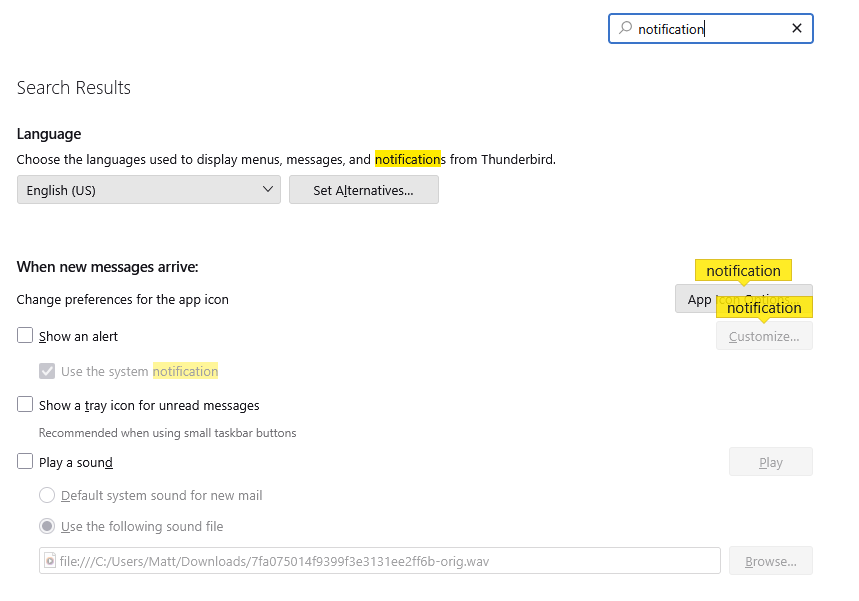
in settings
Все ответы (4)
By alerts, are you referring to updates to Thunderbird? I am unsure of what you mean.
Hi David, thanks for your reply. I refer to an irritating pop-up which comes from the right of my screen when an email is received in my inbox, it is usually entitled "Mozilla Thunderbird ESR" with a short explanation of the email received. It has only been doing it for about 14 days, but it's distracting; it might be from an update? I have looked but cannot find an obvious way to turn it off, regards Robert
Hi Matt. Thanks for your help, and sorry for my very late reply, as I have been busy and also a bit forgetful, but at 81 today I'm still beating the system :-) I am using the latest V 140.40esr, and my settings page is somewhat similar to the example you kindly sent. Unfortunately, I haven't been able to use my PC for the last 2 days and I am not sure if the intrusive ESR pop-up has gone or not. If not, I will get back to you, regards Robert