


Why is TB duplicating local folders that cannot be deleted?

Why is TB duplicating local folders and then why I can't delete those duplicates. The only valid one is the highlighted one in the attach image.
And the message filter are not working properly?
Win10Pro
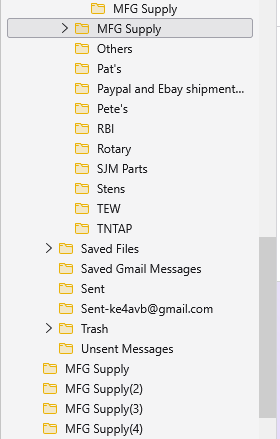
Изменено Wayne Mery
Выбранное решение
I'm not seeing any bug reports about this.
In file explorer, do these additional files show as being read-only?
And, does problem change if you do the following?
- Start Windows in safe mode with networking enabled - https://support.microsoft.com/en-us/help/12376/windows-10-start-your-pc-in-safe-mode
- Still In Windows safe mode, start Thunderbird in Troubleshoot Mode - https://support.mozilla.org/en-US/kb/troubleshoot-mode-thunderbird
Все ответы (7)
A possibility is that thunderbird is not being allowed to update settings. I suggest checking in the profile to see if there is more than one prefs.js file. If you are using an antivirus product or a VPN, I would check settings there also.
Only one Prefs file.
And this is the profile settings file.
[InstallD78BF5DD33499EC2] Default=Profiles/2r1xtvt3.default-release Locked=1
[Profile1] Name=default IsRelative=1 Path=Profiles/6sj9r4nc.default Default=1
[Profile0] Name=default-release IsRelative=1 Path=Profiles/2r1xtvt3.default-release
[General] StartWithLastProfile=1 Version=2
Using Win10 default Windows Security program.
What version of Thunderbird? Note that there was a bug in older versions, so please update to the ESR version (140) at least
TB 143.0.1 (64-bit)
Edition Windows 10 Pro Version 22H2 Installed on 8/16/2025 OS Build 19045.6332
As much I dislike using Microsoft Outlook it is beginning to look like an option that I might need to setup and dump TB. TB use to work great but has a lot of bugs lately. Didn't have this much problems when I was using Windows 7 Pro. It just software providers refused to support the older Windows operating system. My new computer will Windows 11 Pro and this one will be dual boot to Linux Ubuntu once I get Wine to let me run my business accounting software.
The circle folders are all TB self generated and are the ones I can't delete.

Выбранное решение
I'm not seeing any bug reports about this.
In file explorer, do these additional files show as being read-only?
And, does problem change if you do the following?
- Start Windows in safe mode with networking enabled - https://support.microsoft.com/en-us/help/12376/windows-10-start-your-pc-in-safe-mode
- Still In Windows safe mode, start Thunderbird in Troubleshoot Mode - https://support.mozilla.org/en-US/kb/troubleshoot-mode-thunderbird
Okay the whole Profile directory was set as Read Only. Setting to Read/Write seem to have the issue. Strange I didn't set it to read only and how in the world kept having writes if read only. So I delete these self generated areas and the Read Only may have been the problem with the message filters that has been aggravating me.
BTW Neither safe modes resolved the issue before I found the Profile directory set to read only.