


Thunderbird for gmail archiving - All Mail help please

Hi, Forums - I am a new Thunderbird user based on on-line research suggesting Thunderbird as the best way to relieve gmail account with local mailbox archiving. My gmail is out of storage by end of the month and my plan was to move a bunch of old messages into local Thunderbird mailbox to clear room in the google account. I have set up Thunderbird successfully with gmail using IMAP connectivity option. Thunderbird shows same folder structure as labels in gmail and displays all messages from the oldest to newest. So then I tried the "archiving" by setting up a folder structure under Thunderbird's Local Folders. Specifically, to start with I I set up Inbox_archive and Sent_archive and used right click Move To > Local Folders > Folder name to move old messages from live ...@gmail.com tree to Local Folder tree. Since there is also an option Copy To, my understanding was that Move should be different from Copy by also removing messages from gmail and move them to Local folders. At a first glance these steps seemed to work. I see unique old messages in Thuderbird Local Folders. I don't see these messages in Thunderbird's gmail inbox/sent and I also don't see these messages when I search in on-line gmail in:inbox and in:sent. I noticed, however, that google storage size didn't budge. I moved a thousand of more messages in the same way (thinking maybe older messages were just small) and the storage still didn't decrease. I then looked around in on-line gmail and found the messages that I presumed "archived" still sitting in gmail's All Mail. This explains why the storage size didn't change. I searched on the forum and on-line and can't get a confident answer on what am I missing to actually remove the messages from gmail - ideally in the most straightforward manner in one action as a cut and paste from on-line to local folders. Are there any IMAP/account settings that I should have so that Thunderbird's "Move to" actually removes messages from on-line account? Or is there a different archiving command/strategy I need to use?
I am hesitant to do any more trial and error on my own since I already messed up my gmail by having now thousands of messages still sitting in All Mail without proper Inbox and Sent tags and, thus, would appreciate the recommendation from someone who is familiar with my use case.
Thank you.
Изменено GP
Все ответы (20)
I did further research and tried to set up Archiving in Local Folders, per this article: https://support.mozilla.org/en-US/kb/archived-messages Even though the article claims archiving can help manage email server quote, I am observing the same results with gmail as by "Move To" - meaning that message moves from the on-line folder in Thunderbird to a designated archive folder and the label is removed for the message in gmail on-line, but... the message still persists in All Mail, thus still filling up the storage. Any help is appreciated.
To close the loop here, alas, I am giving up on Thurnderbird to use for Gmail. In general I think Thunderbird is one of the better email clients for Gmail when used with a new account or for current emails only. However, it is not suited for the off-line Gmail back up / archive use case. Besides two features above (Move To: and Archive) that don't work with Gmail, I also tried a more laborsome multi-step process of first Copy To: (local folders), Delete from on-line folders within Thunderbird UI, and then empty Trash. This was only partially successful until two actions. First I inadvertently rushed and hit Delete before doing Copy on a bunch of emails and had to fish for them in the Trash and put them back. Secondly after a small number of messages Thunderbird refused to copy more emails from on-line Sent folder to the local folder equivalent. There was no error. It simply wouldn't create selected messages in local folder. I realized it too late after deleting a bunch of Sent mail thinking it was already copied. I am not sure why this happened - maybe there's something special about Sent emails that makes them different from received emails and screws up Thunderbird by copying them into a local folder. Or maybe it is the sheer size of my bloated on-line gmail that Thunderbird 140.2 on Ubuntu is not calibrated to retrieve efficiently. Either way I ended up with a messed up on-line gmail after trial and error with the local Thunderbird client, including duplicated messages from trying to undo relocation of messages that were moved from folders but not deleted and then messages deleted while not actually copied locally, and see no point of trying to continue with Thunderbird. I have previously downloaded my Google data, including gmail, using Google Takeout, so in theory I have my gmail backed up before the Thunderbird experiment. My conclusion is that I will be deleting Thunderbird locally and just keeping my Google Takeout copy. I will then be deleting just enough of the oldest messages in live on-line Gmail directly from All Mail folder to make enough room to keep the account workable. Then at some point in the future I will do another Takeout and this is how I will have my gmail "sort of" backed up on on-going basis. I have not achieved my goal to be able to bring organized gmails by folder/label for convenient browsing off-line. So I am just left with the "blob" of Takeout data that I can theoretically use, if I really really really need to find something in the old messages. This is not ideal, but I haven't found any better way that is reliable and not very time consuming, alas.

I have been wanting to do EXACTLY THIS and am poised to do it... well, until I found this post. Can a knowledgable person confirm whether or not this can be done? I'm paying google $1.99/month to hold my email, and it bothers me deeply to be giving this company (google, that is) any of my money. (I'm slowly shifting out of gmail, but I still need to keep the account running.) I'd like to download ALL my Gmail to TBird, delete much of it off the gmail servers, yet keep it locally, on Thunderbird. Advice before I, too, mess up all my gmail?
If it *can* be done, my next question would be: should I just set up TBird and let it download all (probably close to 100,000 emails), or should I use Takeout to initially set up TBird? Will it download the content of the emails as well as attachments? Thanks!
Изменено operaflute

I've been working to solve this exact issue for a few days now. I'm sorry that I have not kept links to all the articles that have been helpful- there is at least one thread that addresses the Gmail All Mail folder directly. The summary is that Thunderbird stores messages in different folders. Gmail, on the other hand, stores ALL the messages in only one folder: All Mail. What seems to be message folders in Gmail are actually message tags, not folders. That is, what appears to be a message folder is simply all the messages stored in All Mail that have this particular tag. A message can have multiple tags, and appear to appear in multiple "folders" but in fact is stored only once on the Gmail servers.
Thunderbird knows how to read those Gmail tags, creates a folder for each tag, and stores a copy of the message in each of those folders in your user profile.
After Thunderbird has archived messages, and they have disappeared from the corresponding 'folder' on Gmail, the message still needs to be deleted from Gmail's All Mail folder. This is the piece that I have not yet found a tool to do 'automagically'.
Also, you DO NOT want to synchronize the All Mail folder: image attached.
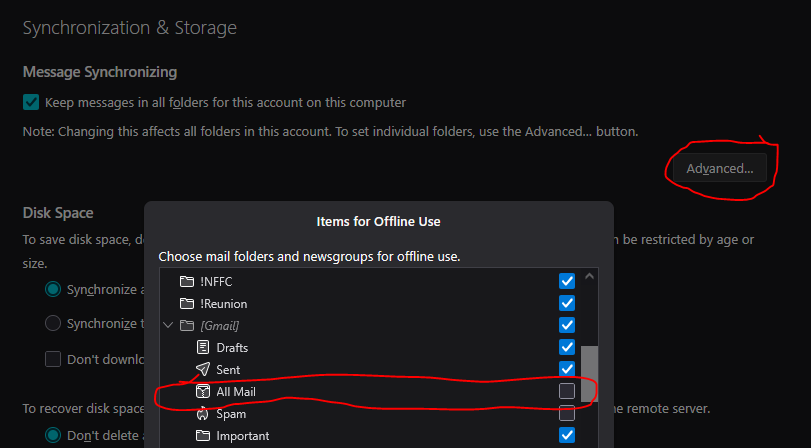
Also, messages "Archived" using Gmail's Archive function simply have the tags removed- so now it's simply an unlabeled message in All Mail.
- I just realized that I've been saying 'tag' and Gmail uses the word 'label'.
Hi, Clifmks and Operaflute! As you can see, there are no replies to the thread from Mozilla developers even though it is an official Support forum. Thus, you should really just go with "what you see is what you get". I guess it won't be too fair to complain about non-working features or lack of Support attention for a free product. Clifmks confirms essentially what I have described in my posts. Thunderbird can read and organize email by gmail labels locally, but it still won't archive email from gmail on-line quota in an organized fashion. Moreover, trying Thunderbird for "archiving" removes gmail labels, but then still leaves messages and attachment data in the gmail on-line quota since the messages are not removed from All Mail. When the labels are removed, the messages are now even more difficult to identify in any categorized way out of All Mail. This is why I gave up on trying Thunderbird for this purpose. Now... to Operaflute's questions. By default gmail Takeout produces one file in .mbox format that essentially consists of that All Mail folder that we have been discussing as the centerpiece of gmail with no obvious categorization. Thunderbird natively supports .mbox format, so theoretically you should be able to do the Takeout and then open resulting .mbox locally and then delete emails from on-line gmail quota. In full honesty I haven't tried it and given the non-working archive features I would give it 50/50 chance that Thunderbird won't choke on a large .mbox file and would import it in full. Try it and post here how it goes. While contemplating the response (and now with AI companions) I found that there is potentially a more graceful way. If you override default Takeout settings for gmail (In Mail section of Takeout go into options and unclick "Include all messages in Mail" and instead select individual labels (there are labels for Inbox and Sent too). Copilot is telling me that this approach will result in multible .mbox files where each contains just emails tagged with selected labels. This should in theory allow you to import the separate .mbox files into separate folders. At this point I have just ordered such Takeout and waiting for google to provide me a download (my previous takeout from last year was just a single .mbox since I wasn't aware of the other option). I am currently pretty busy and even if I get my takeout soon I probably won't get to trying again with Thunderbird for a while. Yet, if this archiving topic is important for you and you think this new approach (multiple .mbox files by label) would be a potential solution for your needs and you prove that it works, then please post here the results since it looks like people are finding these write ups when searching for ways to archive gmail. Thanks and good luck!

GP said
Hi, Clifmks and Operaflute! As you can see, there are no replies to the thread from Mozilla developers even though it is an official Support forum. Thus, you should really just go with "what you see is what you get". I guess it won't be too fair to complain about non-working features or lack of Support attention for a free product.
This is a peer-to-peer support forum for users. You all are giving each other peer-to-peer support.
This discussion may help: https://support.mozilla.org/en-US/questions/1561623
Your challenge with allmail related to space is a Google issue, not a Thunderbird issue. You would have the same issue even if you used only gmail. As far as I know, one must permanently delete messages from gmail's trash in order to free space because allmail includes trash. I assume that you could do that in Thunderbird.
I don't use gmail, so don't rely completely on me.
Setting an archive folder in the local folders account should work.
If you have one blob in takeout, do it again and request messages organized by label/folder.
For 100,000 messages, I would use takeout and then move the mbox files through the file system into the local folders account in Thunderbird. This is not a 50/50 proposition. Many people have done it. But downloads all those messages and then moving them to local folders should work too. Yes, attachments would be included. There are some steps to take to make sure that all messages are completely in Thunderbird.
I have not read this whole discussion carefully, so I may be missing something. I see that you already discovered the other takeout option. If you have more questions, please ask.
Hi, Rick - I am not sure what is the point of your reply, since you say you don't use gmail and just theorizing. This post is about what has actually been tried, what works, what doesn't, and what specific actions users can try further. The discussion is not about gmail - we all at this point understand how it works and how it is different from traditional email services and clients. The topic is about a possibility of using Thunderbird for off-line archiving of gmail in a way that messages can be removed from gmail, yet remain stored locally with retaining their categorization. The fact that Copy To:, Move To:, and Archive features of Thunderbird work the same way and don't remove messages from gmail is 100% Thunderbird issue and not gmail. Either bad design (why have three features that do the same thing) or implementation limitations. The header of each message in gmail is plenty sufficient to identify the message uniquely and perform additional removal from All Mail as part of Archive sequence, if Thunderbird really wanted to make it work. I find it unfortunate that Thunderbird is artificially limiting itself only to use cases of smaller gmail accounts when it is already going 90% of the distance with excellent interface and mapping of gmail labels to folders. On top of so much time and effort already invested in a great email client, there is really just one incremental programming effort of synching up All Mail that would make Thunderbird usable for all gmail users, including those who need to off-load historical emails to a local storage. Since you seem to doubt that my 50/50 chance of ingesting a large .mbox correctly is accurate, please perform an import of a at least a 15 GB .mbox (current gmail account limit) and report back, if you succeed. We will all appreciate it and benefit from this knowledge. My 50/50 chance is based on factual attempt to manually move large amount of emails (1,000+) from a Sent folder within the Thunderbird client from IMAP location to a local folder and it didn't work.
My response was based on personal experience, advice from other people in the forum, advice that I have given to other people in the forum, advice that people have used and that has worked for them. I am not just theorizing. I gave you useful information. Whether or not you use it is up to you.
I did my best to help you because no one else was helping you and you were complaining about not getting a response. You might appreciate both the effort and the information instead of wondering what the point was, being argumentative, and issuing a challenge to me.
Thunderbird does not have storage limits. I have moved large folders into Thunderbird many times. Other users have moved very large folders into Thunderbird using the process that I suggested to you. Some of them have used Google takeout.
If you have difficulty moving 1,000 messages from a sent folder to a local folder, there's something unusual in your system. On my system, copying 2,000 messages from an IMAP folder to a local folder takes about three seconds.
You won't get more help from me. You can wait and see if anyone else responds.

This is not a Thunderbird issue. It is all about Gmail's peculiar, non-standard system. Thunderbird can accommodate it, but you have to work with Gmail's way of thinking.
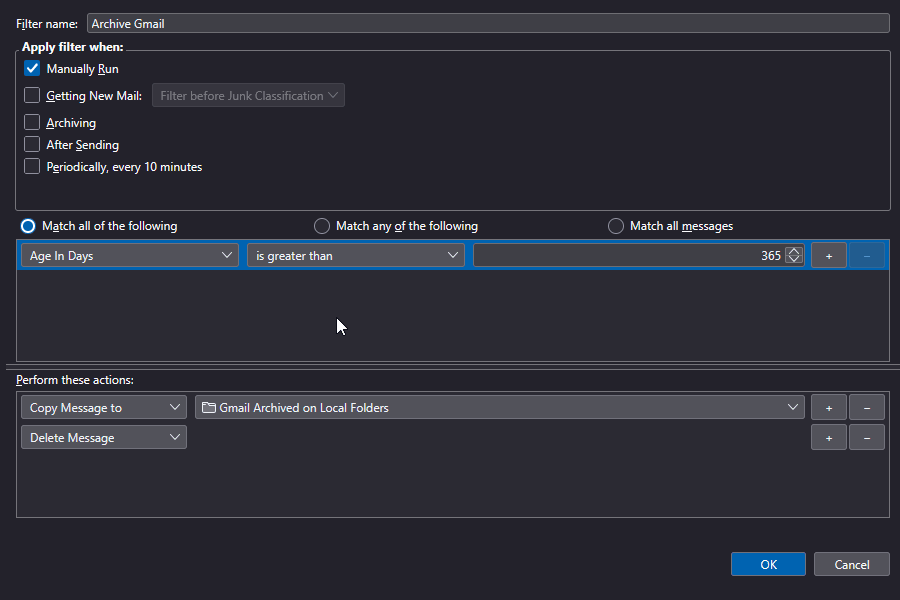
One possible workaround is to make a Thunderbird filter rule that runs manually with the criteria of "more than X days" and the actions, (1) copy to a local folder, and then (2) deletes the message from Gmail.
Hi, Lin - can you elaborate please on where and how you structure the rule that achieves (2) deletes the message from Gmail specifically for the messages (1) copy to a local folder. The issues outlined in this post are all about Thunderbird NOT deleting email from gmail's on-line All mail upon using Thunderbird client's Moving/Archiving features. If there is a way to additionally force delete reliably specific messages from on-line account that have been archived locally, then this could be a solution to the issue.
MOVE operations do not delete messages from Gmail, because there are no actual folders in Gmail to delete from, only labels. To work around that you can COPY the message, then explicitly DELETE it. The filter would look something like the attached image.
GP said
The issues outlined in this post are all about Thunderbird NOT deleting email from gmail's on-line All mail upon using Thunderbird client's Moving/Archiving features.
GP - Run a thought exercise with me. 1. In gmail, move a message from one 'folder' to another. The message is still in All Mail. 2. Still in gmail, archive a message. All that happens is that the message disappears from Inbox; it's still in All Mail. So: what Thunderbird is doing is simply attempting to mimic gmail's behavior. Seems reasonable to me.
If there is a way to additionally force delete reliably specific messages from on-line account that have been archived locally, then this could be a solution to the issue.
Lin's suggested filter looks to me like it should accomplish what I think you are asking. I believe (although I can't say that I have definitively confirmed) that (from gmail) deleting a message from any 'folder' where it appears removes that message from ALL gmail 'folders', including All Mail. If this is the case, explicitly deleting a message from a linked gmail IMAP (or POP3) using Thunderbird should accomplish the same thing.
I'm fairly certain I do not understand Thunderbird's archive command. I know I have read multiple cautions against ever trying to use it, so I have ignored it.
I last used Thunderbird over a dozen years ago. It worked very well for following several newsgroups and three different email providers. As my use case and work environment changed my need for those functions faded, and one day I never installed Thunderbird on my new computer.
Now, due to my desire to accomplish essentially your OP request, I have installed Thunderbird again and am working my way through all the pieces I thought I knew but am discovering that there was stuff going on behind the scenes that I wasn't aware of. Stuff that is messing with how I expected things to work. I posted a description of what I have learned so far over in Operaflute!'s thread here.
GP - Run a thought exercise with me. 1. In gmail, move a message from one 'folder' to another. The message is still in All Mail. 2. Still in gmail, archive a message. All that happens is that the message disappears from Inbox; it's still in All Mail. So: what Thunderbird is doing is simply attempting to mimic gmail's behavior. Seems reasonable to me.
Thank you clifmks for the thoughtful response and describing what has worked for you. In the thought exercise we need to establish the definition. What I understand under "archiving" is taking an item from one location and moving it to another physical location with the same categorization of the item and in a way that the item no longer exists in the original location. Thus, your thought exercise is certainly valid, but you are talking about "archiving" within the same location (i.e. moving from folder to folder or changing label attributes, as it is the case when messages are located in the on-line gmail). I get it, I understand that gmail labels are not the same as folders, but I am trying to achieve a systematic process of removing messages from gmail and storing them locally while preserving categorizations (be it in the form of labels, folder structure, hashtags, or whatever). I had no problem managing between labels and folders and I like how Thunderbird natively maps labels to folders when adding a gmail account. My problem has always been with the lack of simultaneous removal of the message from gmail on-line when the message is put into an intended local "archival" destination with Thunderbird's desktop client. This is important for the purpose of the "archive" definition that I am using above because otherwise there are definite risks of disconnects that result in messing up gmail for the same reasons that we all understand about Gmail's labels vs All Mail architecture. At this point with all responses this thread definitely confirms that such systematic archival is not possible with Thunderbird's Move To:/Archival features and instead requires at least a two step process (Copy + Delete). Now, I believe the process you have described (and thank you for linking more detail in response to operaflute) will achieve a reliable one-time (aka point-in-time) archiving. I really like your idea of doing OS copy of the imap.gmail.com content as it is a simpler approach to managing Takeout files. Augmenting this with Lin's rule may ultimately be a solution. In Lin's rule screen shot he copies and deletes everything based on the time stamp. For my purposes I will need to experiment with copying and deleting using a combination of elements (e.g. specific folders in addition to timestamp) to achieve categorization. Separate "thank you" shout out to Lin for including the screen shot and recommending the delete action in the rule. My gmail is coming up to being full again in a month or so and I will be trying out the recommendations.
PS - funny that everyone in the forum seems to be upset with me saying there are problems with Thunderbird working (or not working) in a certain way, yet at the same time everyone says "don't use archiving feature" ;) Yet let's not pick up the topic of "problems" with Thunderbird again ;)
Just a comment: from my experience, Thunderbird's archive does not fit with Allmail. Further, using MOVE for messages can be a disaster. COPY and DELETE work. I wish you well in your pursuit.
Regarding David's remark "using MOVE for messages can be a disaster" ... Move is an invitation for disaster in any environment and always has been, in my experience. (Off Topic: One could generalize and postulate that convenience always increases risk.)
GP- You're welcome. You are absolutely correct that definitions are critical. I've been dinking around with software and computers for over 40 years now. One thing I have learned is: My definition is largely irrelevant*. The only definition that matters is the developer's definition. [Not wanting to quarrel with you, just sharing an observation.] Of course, when their definition doesn't fit my use case it's my life that is impacted, not theirs. So yes, the aggravation is real.
- My definition is important as well, because it's only when I accurately understand the difference between my definition and the developer's definition that I can begin to work towards a solution for my dilemma.
From my recollection of all the reading I've done here over the past few days, I think the warnings against using Thunderbird's Archive tool have to do with potential loss of data. That is, there seem to be cases where archive has burped and users lost messages. As this is not a Thunderbird Developer forum, nor a designated space for bug reports or feature requests, we are left with trying to help each other make the best of an imperfect situation.
And based simply on this thread, and the valuable contributions from Rick, David, and Lin, this forum is accomplishing its purpose. In fact, it was through searching here that I learned what I needed to accomplish the process I shared with you above.
Now I'm shifting gears: You mention "using a combination of elements (e.g. specific folders in addition to timestamp) to achieve categorization." In my situation I wish to weed out duplicates in my Local Folders message store. (Don't ask. SNAFU is a real thing.) To that end, I was trying out Eyal Rozenberg's Remove Duplicates and discovered a discussion of Betterbird. I bring this up because Butterbird claims to have a superior filtering engine that can accomodate complex criteria. You might wish to investigate further. (These issues are both different topics, so I won't discuss any further here.)

Hi, I stumbled on this thread while looking for something quite different. So sorry if this doesn't help, but it occurred to me that if you used POP rather than IMAP you could set it up to delete messages from the gmail server automatically. If you set it to leave them on for say 60 days before deleting, you can still see the last 60 days directly on gmail when away from your Thunderbird client (e.g. on your phone) but the storage problem goes away. I'm not going to come back here, so don't bother telling me if I've missed the mark. If it works, you're welcome. Have a good one.
Okay, the filter option as posted by Lin lines up with the "never move, always copy and delete" concept. I am both tempted and terrified to try it. But it would accomplish exactly what I am trying to do. Use Thunderbird daily, and also get majority, but not all, of my data off of gmail's servers.
Изменено operaflute