


Windows 10 reached EOS (end of support) on October 14, 2025. If you are on Windows 10, see this article.

Поиск в поддержке

Избегайте мошенников, выдающих себя за службу поддержки. Мы никогда не попросим вас позвонить, отправить текстовое сообщение или поделиться личной информацией. Сообщайте о подозрительной активности, используя функцию «Пожаловаться».

Подробнее

Disable floating video while scolling on a website

  • 1 ответ
  • 1 имеет эту проблему
  • 117 просмотров
  • Последний ответ от TyDraniu

Hi all,

Just updated to version 142.0.1. I now have the annoying behaviour back that video's on a website pop out on the screen while scrolling on a webpage and they are in the way of the text. I don't want any videos popping out. In the past I had it resolved somehow, so it looks like the update "undid" these. If I'm correct I might have changed a setting in the about:config.

I found multiple articles stating to uncheck "Enable PIP controls" in the setings, section [General] - [Browsing]. This options was moved to the [Firefox Labs] section within the setting. This option however is already disabled.

This page does not resolve the issue: https://support.mozilla.org/en-US/kb/about-picture-picture-firefox#w_why-dont-i-see-the-picture-in-picture-toggle

How can I prevent a video popping out on the screen an float above the web page? I just want to keep it in the window\frame where it belongs.

Link of a page where I have the issue: https://www.telegraaf.nl/video/oprichter-sbs-hiermee-onderscheidt-sbs-zich/86683036.html Also attached a screenshot.

Thanks in advance.
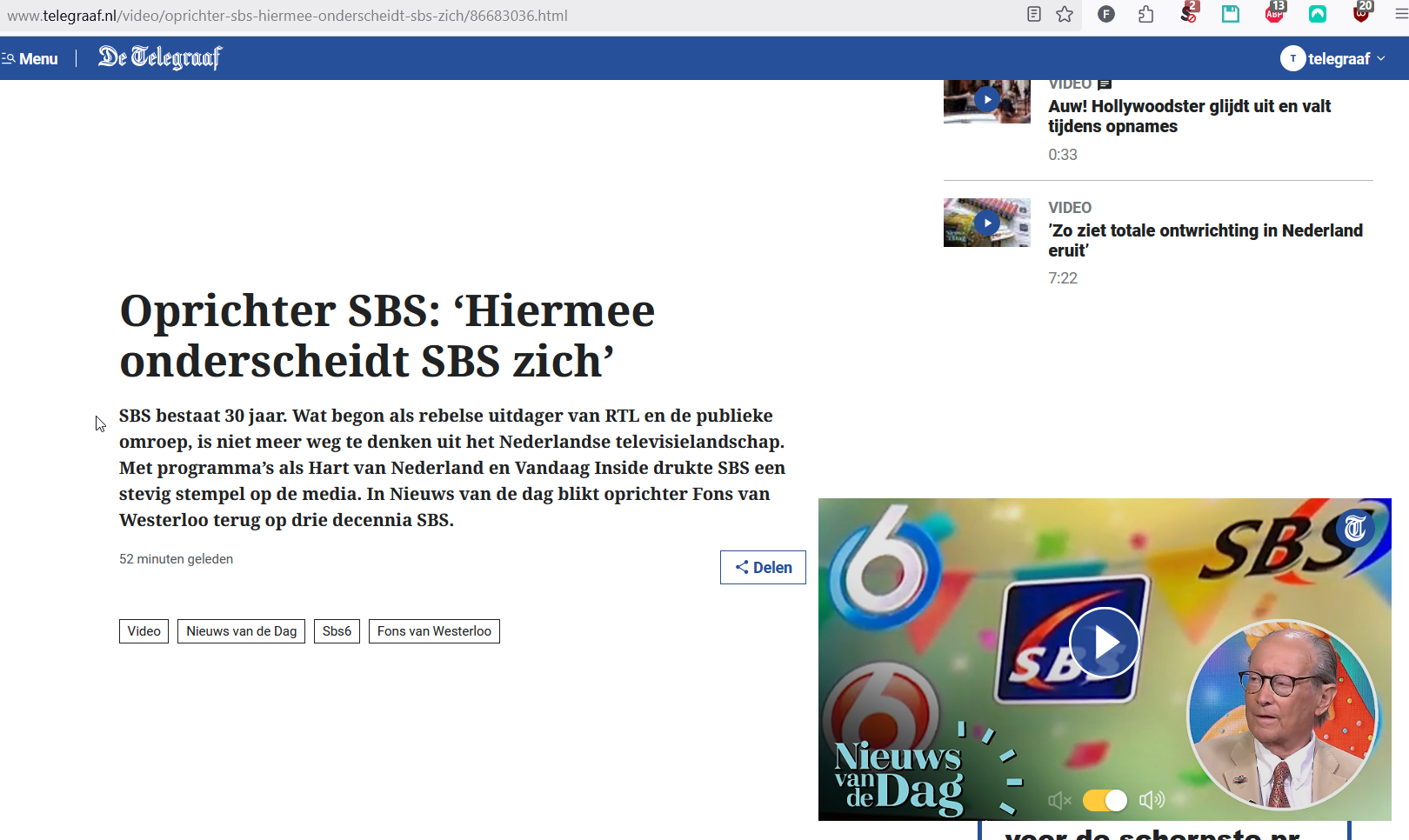
Hi all, Just updated to version 142.0.1. I now have the annoying behaviour back that video's on a website pop out on the screen while scrolling on a webpage and they are in the way of the text. I don't want any videos popping out. In the past I had it resolved somehow, so it looks like the update "undid" these. If I'm correct I might have changed a setting in the about:config. I found multiple articles stating to uncheck "Enable PIP controls" in the setings, section [General] - [Browsing]. This options was moved to the [Firefox Labs] section within the setting. This option however is already disabled. This page does not resolve the issue: https://support.mozilla.org/en-US/kb/about-picture-picture-firefox#w_why-dont-i-see-the-picture-in-picture-toggle How can I prevent a video popping out on the screen an float above the web page? I just want to keep it in the window\frame where it belongs. Link of a page where I have the issue: https://www.telegraaf.nl/video/oprichter-sbs-hiermee-onderscheidt-sbs-zich/86683036.html Also attached a screenshot. Thanks in advance.
Приложенные скриншоты

Все ответы (1)

This is not a Firefox issue. This is a feature of that website and it works like this in every browser. You can't disable it with PiP controls.

You could eventually use ublock origin to disable it.