


Windows 10 reached EOS (end of support) on October 14, 2025. If you are on Windows 10, see this article.

Поиск в поддержке

Избегайте мошенников, выдающих себя за службу поддержки. Мы никогда не попросим вас позвонить, отправить текстовое сообщение или поделиться личной информацией. Сообщайте о подозрительной активности, используя функцию «Пожаловаться».

Подробнее

Thunderbird creates spam folder when I already have a junk folder (bug1985372)

  • 1 ответ
  • 4 имеют эту проблему
  • 187 просмотров
  • Последний ответ от Wayne Mery

I use Thunderbird desktop to access IMAP email from my hosting provider. My hosting provider includes a junk email folder named "Junk" with the path "...hosting.com/INBOX/Junk. I cannot delete this folder.

Whenever I run Thunderbird, it creates a second folder named "Junk" with the path "...hosting.com/INBOX/spam. If I right-click on this folder and delete it, it is re-created the next time I start Thunderbird. I have gone into "Junk Settings" unchecked the "Move new junk message to..." checkbox thinking that this is causing Thunderbird to mistakenly create an extra junk/spam folder but it continues to create that extra junk folder.

How do I stop this from happening? I should only require one junk/spam folder.
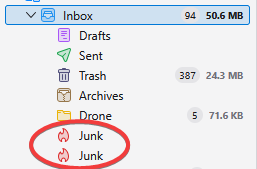
I use Thunderbird desktop to access IMAP email from my hosting provider. My hosting provider includes a junk email folder named "Junk" with the path "...hosting.com/INBOX/Junk. I cannot delete this folder. Whenever I run Thunderbird, it creates a second folder named "Junk" with the path "...hosting.com/INBOX/spam. If I right-click on this folder and delete it, it is re-created the next time I start Thunderbird. I have gone into "Junk Settings" unchecked the "Move new junk message to..." checkbox thinking that this is causing Thunderbird to mistakenly create an extra junk/spam folder but it continues to create that extra junk folder. How do I stop this from happening? I should only require one junk/spam folder.
Приложенные скриншоты

Изменено Wayne Mery

Все ответы (1)

Please create a bug report at https://bugzilla.mozilla.org/enter_bug.cgi?product=thunderbird with details including your provider/domain name.