


Mozilla standard sidebar

Mozilla sidebar has been replaced by "Choose an AI chatbot to use in the Firefox sidebar." How do I undo this and return to Mozilla standard Firefox sidebar. Not at all what I want to do. Help
Выбранное решение
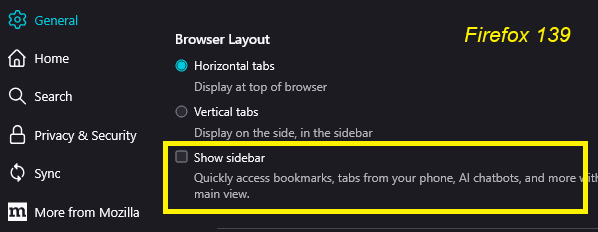
The classic sidebar is still available. If you don't need the vertical tabs feature, you can switch by going to
Settings page > General panel > Browser Layout section
And un-checking the box for "Show sidebar"
After that, the vertical launcher bar at the left side should disappear and you can use it the old way.
Прочитайте этот ответ в контексте 👍 1Все ответы (5)
Could you please tell me if there is a close button in the top right corner of the AI sidebar?
Выбранное решение
The classic sidebar is still available. If you don't need the vertical tabs feature, you can switch by going to
Settings page > General panel > Browser Layout section
And un-checking the box for "Show sidebar"
After that, the vertical launcher bar at the left side should disappear and you can use it the old way.
Thanks all. Issue resolved

How do you get rid of the wasted inch of space to the left of the new sidebar?
jessica18 said
How do you get rid of the wasted inch of space to the left of the new sidebar?
Do you mean the button bar? Turn off "Show sidebar".