


REMINDER PANEL is UNRELIABLE

(1) Please add more choices to the Triage Topics dropdown list:
- CALENDAR !!!
- OTHER [with text-entry box]
- ... ??? ...
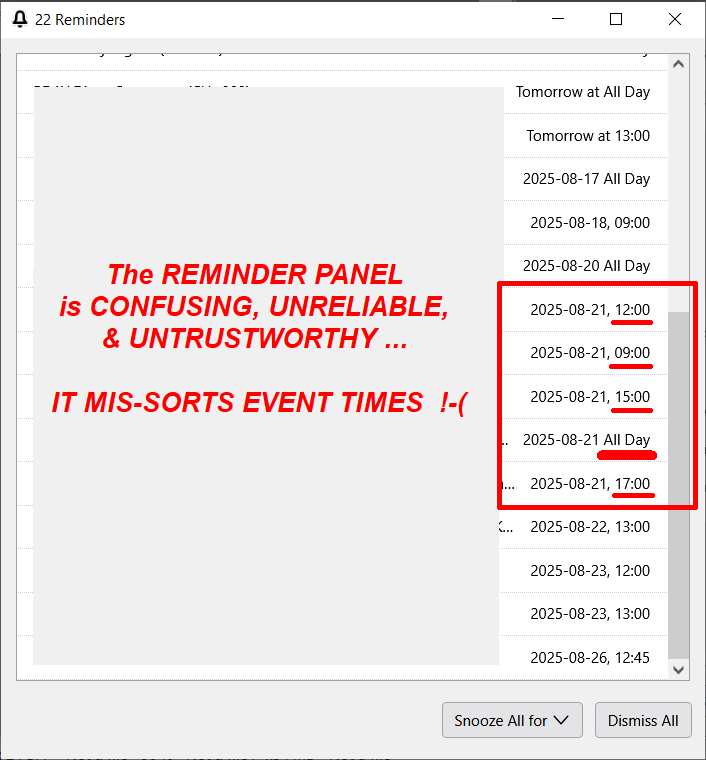
(2) REMINDER PANEL is UNRELIABLE. see attached screenshot file: (REMINDER PANEL is UNRELIABLE.png)
Thank you, Mike Ramey
Все ответы (5)
Выбранное решение
I will mark this down as a feature request and look into the bug you are reporting. Thank you for sharing!
Thank you! -mr
ThundaMike --
SUMMARY: It appears to me that the current Thunderbird CALENDAR IS NOT READY FOR PRIME TIME :-(
DETAILS:
I have discovered several different components / views of the Calendar information:
=1= the CALENDAR TAB / WINDOW -- and within that: =2= the CALENDAR PANE -- vertically on the left, and =3= the TODAY PANE -- vertically on the right, and =4= the REMINDERS WINDOW -- (which is _not_ shown on the Alt-View drop-down menu :-?
In addition to the Event-Time Sorting Error reported above in the Reminder Panel / REMINDERS WINDOW, I have experienced these additional problems (as I can best remember them):
A
I defined an event (appointment) that occurs every-weekday for 6 weeks (30 appointments), and they all appeared in the REMINDERS WINDOW (good) -- BUT ... when I [Dismiss]ed the first appointment from the REMINDERS WINDOW, ... all 30 appointments vanished from the REMINDERS WINDOW -- _even tho_ they still appeared on the CALENDAR TAB / WINDOW.
B
The only way I have discovered to PRINT [selected] EVENTS from the Calendar is from the CALENDAR TAB / WINDOW.
=C= ... from the CALENDAR TAB / WINDOW ... if there is _NO-SELECTION_ "(Events ... contain 'string')", the mouse-wheel will cause vertical scrolling of the events in the window,
-- BUT ... if there _IS-A-SELECTION_ e.g.: "(Events ... contain 'KPW')", the mouse-wheel will __NOT__ cause vertical scrolling of the events in the window :-(( ??? ...
-- SO ... the only way I have fount to PRINT [selected] EVENTS from the Calendar is:
- turn my monitor to the vertical position, [CTRL-ALT-<--] to rotate the display, [PrtScr], [IrfanView], format, & PRINT.
.... and even then ...
D
The event start times are sorted accurately BY DAYS ... but are _NOT_ RELIABLY SORTED CORRECTLY BY START TIME WITHIN EACH DAY :-\
SUMMARY: Thunderbird CALENDAR IS NOT READY FOR PRIME TIME :-(
Am I missing someting?
--Mike Ramey
E
Management of the CALENDAR TAB / WINDOW is a mess!
- Sometimes, the left side of the data is outside the window; to bring it back into view, I click another TAB in the window, then click the "Calendar" TAB.
F
- This appointment DOES SHOW in the TODAY PANE, but it DOES _NOT_ SHOW in the CALENDAR TAB / WINDOW or the REMINDERS WINDOW:
Title: KPW- WEEKLY Radiation PROGRESS VISIT - MB-A Rad.Onc. >Oct-6. Calendar: Home Start Date: 2025-10-10, 14:00 End Date: 2025-10-10, 14:30 Repeat: Occurs every week effective 2025-08-29 until 2025-10-10 from 14:00 to 14:30. Reminder: 60 days before the event starts
The latest date on the CALENDAR TAB / WINDOW is 2025-09-25. The latest date on the REMINDERS WINDOW is 2025-10-01.
G
The CALENDAR TAB / WINDOW used to have the event-list at the top, + a seriously squished grid calendar display below. It was pretty much useless, because it was so compressed. But today, i moved the division line between list and grid down to the point where the grid has totally disappeared, which is fine with me, because I'm interested in a PRINTABLE APPOINTMENTS LIST.
However, I remember a long time ago, I moved the list/grid divider-line up so far that THE LIST DISAPPEARED and it was all grid.
Again, the management of the CALENDAR TAB / WINDOW is (imo) a mess.
--Mike Ramey
=C= CORRECTION:
The situation reported above, may be entirely incorrect, because now the vertical scrolling is working.
It may be, when I reported this behavior, that the 'KPW' data _entirely filled-&-fit within the window_ and that's why it did not scroll down. I have since added more 'KPW' events.
START OF EARLIER REPORT -----
... from the CALENDAR TAB / WINDOW ... if there is _NO-SELECTION_ "(Events ... contain 'string')", the mouse-wheel will cause vertical scrolling of the events in the window, -- BUT ... if there _IS-A-SELECTION_ e.g.: "(Events ... contain 'KPW')", the mouse-wheel will __NOT__ cause vertical scrolling of the events in the window :-(( ??? ...
END OF EARLIER REPORT -----