


Windows 10 reached EOS (end of support) on October 14, 2025. If you are on Windows 10, see this article.

Поиск в поддержке

Избегайте мошенников, выдающих себя за службу поддержки. Мы никогда не попросим вас позвонить, отправить текстовое сообщение или поделиться личной информацией. Сообщайте о подозрительной активности, используя функцию «Пожаловаться».

Подробнее

Firefox 136.0.3 opens to small non-functional window

  • 1 ответ
  • 0 имеют эту проблему
  • 95 просмотров
  • Последний ответ от tn

I have updated FF on four PCs to 136.0.3. On just one PC, FF launches to a small window which is completely non-functional. None of the visible controls do anything. I can't move the window but I can resize it but everything is greyed out except the search bar. I can type in the search bar but get no search.

I have read a number of similar posts, but these fixes do not work: I cannot toggle the full screen using F12, I cannot change the launch behavior by setting 'maximize' in the shortcut properties, Deleting xulstore.json (repeatedly) does not fix (I have no localstore.rdf), I have no access to any of the normal FF controls that would let me refresh or troubleshoot.

I could always reinstall, but thought I would ask first.
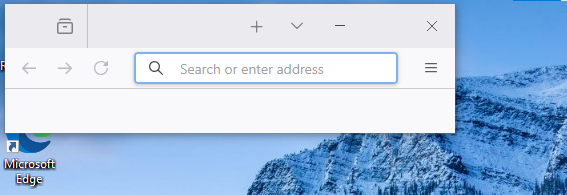
I have updated FF on four PCs to 136.0.3. On just one PC, FF launches to a small window which is completely non-functional. None of the visible controls do anything. I can't move the window but I can resize it but everything is greyed out except the search bar. I can type in the search bar but get no search. I have read a number of similar posts, but these fixes do not work: I cannot toggle the full screen using F12, I cannot change the launch behavior by setting 'maximize' in the shortcut properties, Deleting xulstore.json (repeatedly) does not fix (I have no localstore.rdf), I have no access to any of the normal FF controls that would let me refresh or troubleshoot. I could always reinstall, but thought I would ask first.
Приложенные скриншоты

Все ответы (1)

When I saw 136.0.4 was released very quickly, I went ahead and reinstalled which fixed the problem. I didn't restore the original xulstore.json before I did this and possibly as a result it didn't seem to preserve anything from the prior install. Not a big deal for this PC, but it would be useful to know if there were a less destructive way to recover from this situation.