


Intune CSP - UserMessaging Firefox Labs
We have Firefox deployed and managed through Intune/Endpoint and all works well but every device has an error with this line of the policy:
UserMessaging_FirefoxLabs [./Device/Vendor/MSFT/Policy/Config/Firefox~Policy~firefox~UserMessaging/UserMessaging_FirefoxLabs] STATE Error SOURCE PROFILES Source Profile Mozilla_Firefox_Configuration ERROR CODE 0x87d1fde8
The error code is the same on all devices and is the only one present in on each device config.
Does anyone have any idea what the issue and resolution would be?
Thanks, Matt
Выбранное решение
The first screenshot you posted seems to indicate that you are using the new Import Templates Feature (https://learn.microsoft.com/en-us/intune/intune-service/configuration/administrative-templates-import-custom)
But the second screenshot indicated that you've used a custom configuration.
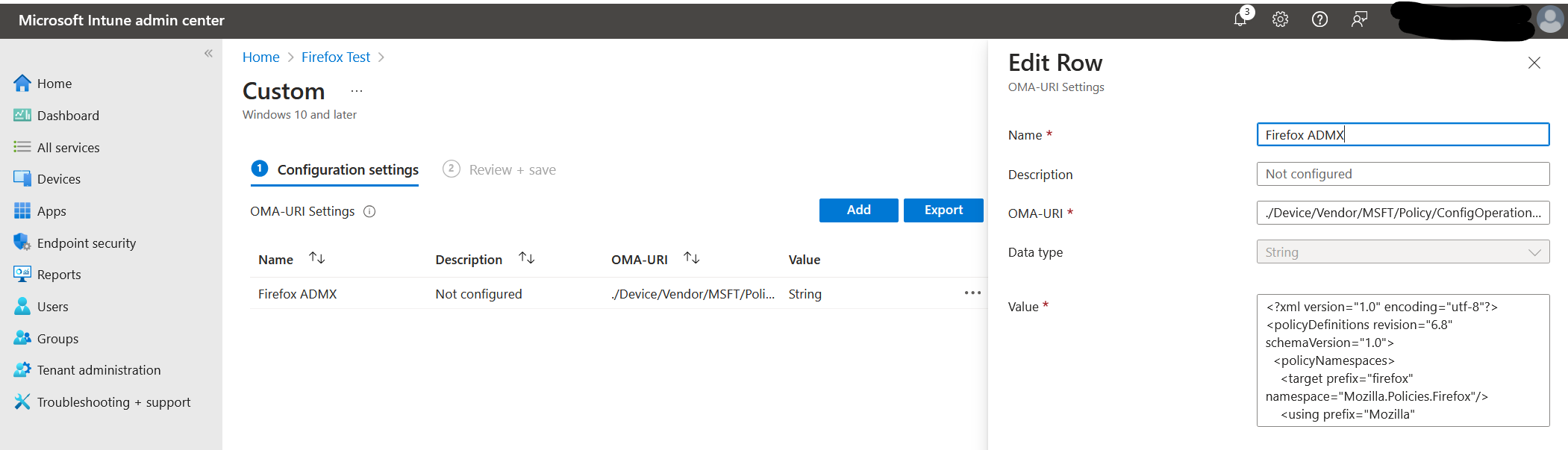
If you're using a custom configuration, it's not using the ADMX template in your screenshot, it would be whatever version you last put into your custom configuration:
See the screenshot below.
Прочитайте этот ответ в контексте 👍 0Все ответы (4)

How recent are your policy templates? That was added in Firefox 130.
Do you have the minimum version of the ADMX templates?
Please see the version and errors below


Выбранное решение
The first screenshot you posted seems to indicate that you are using the new Import Templates Feature (https://learn.microsoft.com/en-us/intune/intune-service/configuration/administrative-templates-import-custom)
But the second screenshot indicated that you've used a custom configuration.
If you're using a custom configuration, it's not using the ADMX template in your screenshot, it would be whatever version you last put into your custom configuration:
See the screenshot below.
Thank you, this has resolved the issue - I had been following 2 different pieces of guidance inadvertently.