


Fonts are rendering incorrectly or not at all.

Fonts are rendering incorrectly or not at all. Sample image attached. I'm using Thunderbird 128.5.2esr (64-bit) on Windows 10 Home.
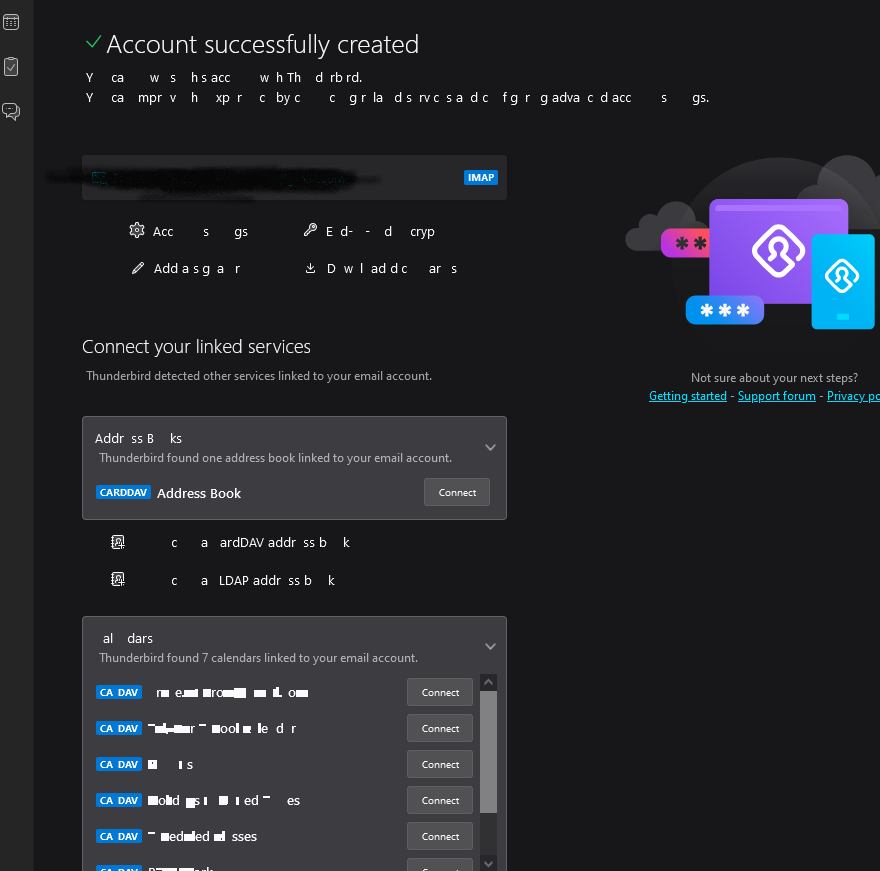
Выбранное решение
If hardware acceleration is enabled in TB normal mode (Settings/General), disable it, restart TB, and see if the display remains stable. Acceleration is disabled in safe/troubleshoot mode.
As an aside, I would add the TB profile folder as an exception or exclusion in Bitdefender settings. Not that I think it affects display issues.
Все ответы (5)
For us to better investigate this issue, we will need some more information.
Could you please do the following?
- Open the menu
 > Help > Troubleshooting Information, then click Copy text to Clipboard.
- Go to https://pastebin.mozilla.org/, paste the clipboard by right clicking in the large text area, select paste from the menu, change the retention period to expire in 21 days, use the Paste Snippet button to create a page containing your info, then copy the resulting URL (address) of the page created.
- Open a reply to this post, and paste the URL to your troubleshooting information you just copied.
- Please also provide results for the following test on your system
- Does Thunderbird work as expected in Thunderbird troubleshooting mode?
- Does Thunderbird work as expected with your OS started in safe mode with Networking. Instructions for each operating system: Windows 10/11, Windows 8, Windows 7, OSX
Does the same thing happen in safe/troubleshoot mode (hold Shift when launching TB)?
Thank you for responding.
Here's the link to the troubleshooting information.
Thunderbird is working in troubleshooting mode and appears to be working in Windows safe mode with networking. It looked like the problem was resolved after I restarted from safe mode, but it gradually started reappearing.
Выбранное решение
If hardware acceleration is enabled in TB normal mode (Settings/General), disable it, restart TB, and see if the display remains stable. Acceleration is disabled in safe/troubleshoot mode.
As an aside, I would add the TB profile folder as an exception or exclusion in Bitdefender settings. Not that I think it affects display issues.
Thank you for your help with this problem and the advice on the TB profile folder exclusion in Bitdefender. Disabling hardware acceleration solved the issue.