


taskbar icon does not indicate when new email is available

Taskbar icon does not indicate when new mail has arrived. Does not show a count of new/unread messages. 128.3.2 Windows 11
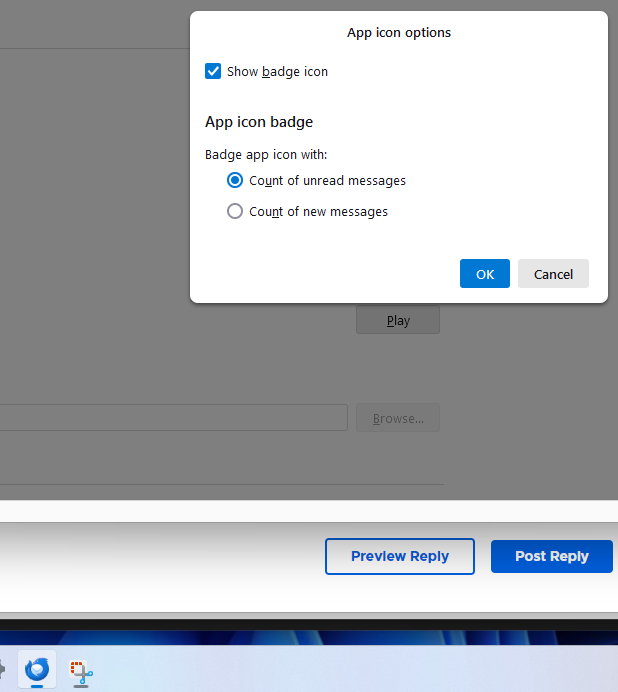
In settings "incoming mail" icon options I have chosen "show count of new emails" and "show a tray icon for unread messages is checked".
I am unable to tell at a glance if new email has arrived. I see from researching the KB I'm not the only to have this issue, but none of the settings seem to help.
Выбранное решение
Check Windows Settings for System/Notifications and Personalization/Taskbar behaviours, Show badges.
Все ответы (5)
In Settings/General, Incoming Mails, App Icon Options, select 'count of unread messages'. That seems to display the number in the icon that's useful.
That value is checked, but my taskbar icon doesn't display any numbers or any indication of new emails. There is little bar underneath it that highlights when thunderbird is not minimized, but that's it. I wonder if its some kind of windows setting that is hiding the values. I went through the windows settings for taskbar behavior to see if I could figure anything out but still now showing anything.
Выбранное решение
Check Windows Settings for System/Notifications and Personalization/Taskbar behaviours, Show badges.
Yes one of those windows must have done the trick, I was playing around with them not sure which one made the difference but its working now thanks !

I have the same problem - no new message count on the taskbar icon. I have Show a tray icon for unread messages checked. I looked at my Windows/Personalization settings/Taskbar behaviors and Show badges on taskbar is checked. I didn't do anything different from my previous installation, but then the badges with a number are showing. As soon as I installed an extension (keeprunning), the numbers stopped appearing. I don't think I want to reinstall again, so maybe there is a interference bug either in the program or the extension.
Изменено Corvus Corax