


Trojan: SLocker, a virus, from Microsoft, has a pop up everytime I open Firefox. I am using Private Firefox now and there is no problem. But, I would like to get rid of this pop up; it's trying to sell me Windows 11 and stop using Windows 10.

How do I get rid of this Microsoft pop up on regular Firefox?
Все ответы (1)
Please read these guides to remove it. You will have to install some malware cleaning programs though. Like Malwarebytes Free or Hitman Pro, for example. They will clean out this annoying virus.
2 guides I found:
- https://malwaretips.com/blogs/remove-chrome-is-infected-with-trojan-slocker/#windows
- https://www.myantispyware.com/2023/10/26/trojanslocker-pop-up-scam-how-to-stay-safe/
Take some time to scroll these pages. They are long. But I think your problem for Firefox is the virus is hiding itself in your Notifications Permissions area. See screenshot: https://www.myantispyware.com/wp-content/uploads/2019/08/firefox-spam-notifications-removal.2.jpg
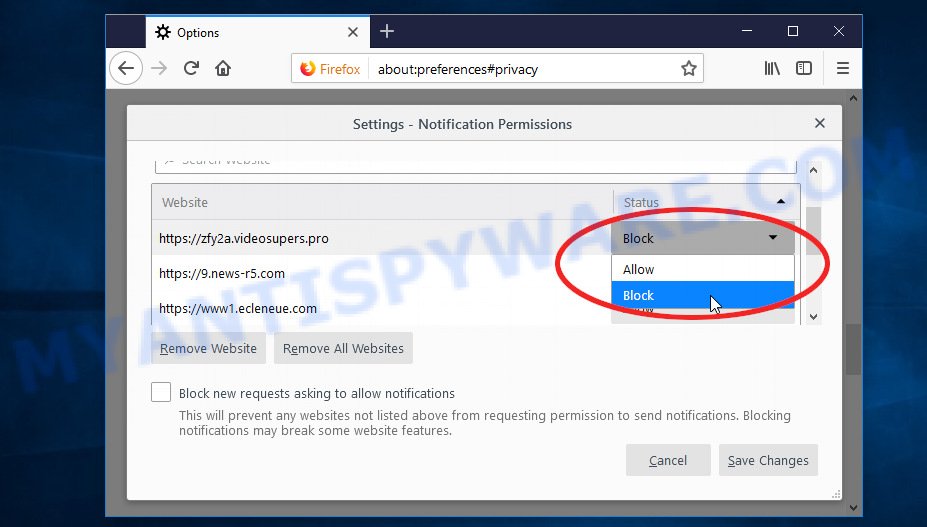
To jump to the settings area, copy & paste this into the url bar: about:preferences#privacy
- Scroll down to "Permissions" section
- Click "Settings" button for Notifications
- Click "Remove All Websites" button
- Click to put a checkmark on "Block new requests asking to allow notifications" option
- Click the "Save Changes" button
- Now close Firefox and open it again
Let us know if that fixed it. If not, you will need to use malware cleaning programs like Malwarebytes Free or Hitman Pro to clean off this super annoying malware.