


import data from Outlook

I have a gmail account on Outlook. Can I move it / duplicate it to Thunderbird?
Выбранное решение
Yes.
You haven't said if you already have Thunderbird set-up for other accounts. If not when you install it it will initially ask for your e-mail address and password so enter those for your GMail account.
If it is already set-up for other accounts go to Account Settings > Account Actions > Add E-Mail Account and do it there.
Either will have Thunderbird connecting to it AS WELL as Outlook. If you only want Thunderbird to, delete the account in Outlook.
Прочитайте этот ответ в контексте 👍 0Все ответы (6)
Выбранное решение
Yes.
You haven't said if you already have Thunderbird set-up for other accounts. If not when you install it it will initially ask for your e-mail address and password so enter those for your GMail account.
If it is already set-up for other accounts go to Account Settings > Account Actions > Add E-Mail Account and do it there.
Either will have Thunderbird connecting to it AS WELL as Outlook. If you only want Thunderbird to, delete the account in Outlook.
Thank you for this. I do already have Thunderbird with 2 accounts but Account Settings doesn't appear to have Account Actions or Add email account.
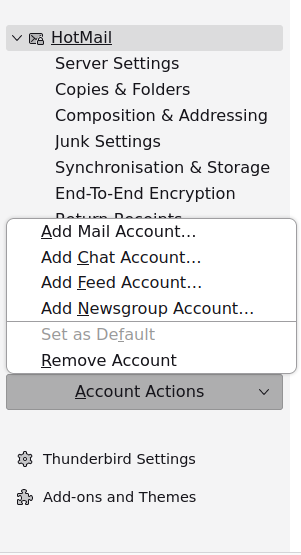
I've found an alternative way.
Click on one of your existing account names in the folder tree on the left of the normal mailbox view — it will be in bold. That brings up a screen with a section headed "Choose What to Set Up." Click "E-mail" under that.
You are very patient and knowledgeable and I'm grateful for your help. I think I must have old versions, (plus I'm in my 80s!) so I just can't find the righjt paths. Thank you anyway.