

Эта тема была архивирована.
Если вам нужна помощь, задайте новый вопрос.

Решено
Архивировано
new e-mail account has its own folder

Hello.
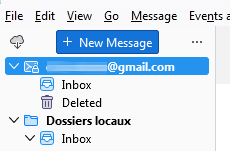
I just removed and added again an e-mail account and now I have a folder for this e-mail account aside from local folders. I do not want it to have its own folder. My other e-mail accounts just use the local folders, they do not have their own folders, and it was the same for this one before.
How can I add this e-mail account to the local folders instead of having its own folder ?
Thanks
Hello.
I just removed and added again an e-mail account and now I have a folder for this e-mail account aside from local folders.
I do not want it to have its own folder. My other e-mail accounts just use the local folders, they do not have their own folders, and it was the same for this one before.
How can I add this e-mail account to the local folders instead of having its own folder ?
Thanks
Все ответы (2)
Выбранное решение
Assuming the account is set up as POP.
Account settings > server settings > advanced and click on the inbox for a different account and select the local folders account.
Thanks.