


Outlook.com sign in screen non-functional
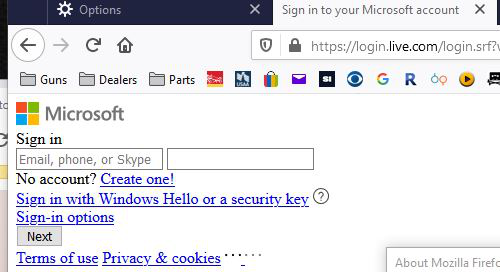
After updating to 76 on Windows 10, the outlook.com sign on screen comes up as shown in the attachment. I've done a complete reset of Firefox, cleared the cache and tried safe mode. It was working fine until I closed Firefox and it completed the update. Outlook.com is working fine in Chrome.
Выбранное решение
I think it was actually an issue with the site. I tried a few hours later and it worked.
Прочитайте этот ответ в контексте 👍 0Все ответы (2)
You get this issue when CSS files are blocked. It is possible that your security software is blocking content.
What security software do you have ?
Boot the computer in Windows Safe mode with network support to see if that has effect in case security software is causing problems.
Выбранное решение
I think it was actually an issue with the site. I tried a few hours later and it worked.