How do I highlight text I am composing/writing for an email to send?

When I compose/write and email, I can't seem to be able to highlight a word, I can only find highlighting text or email body background. Any/All add-ons, at this time, seem to not work or work with the current Thunderbird version.
Выбранное решение
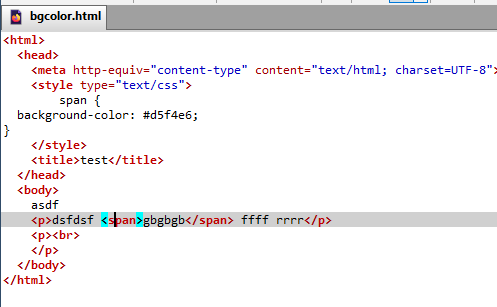
It can be done if you're willing to add html manually, and define a span style. The ThunderHTMLedit add-on is useful. There is an example in the attached picture, as the code is not properly displayed in this forum.
Прочитайте этот ответ в контексте 👍 0Все ответы (2)
For a work around, do this;
Step 1) Open a New Microsoft Word Document. Step 2) In the Word Document enter a word(s) that you want to use for Thunderbird Email. Step 3) Double Click the word, or choose multiple words and highlight. Step 4) From the Home Ribbon go to Text>Font and choose your Font (probably want to choose what you have for your Thunderbird Email). Step 5) From the Home Ribbon go to Text>Font Size and choose your Font Size. Step 6) From the Home Ribbon go to Text>Text Highlight Color and choose your Text Highlight Color. Step 7) Cut, or Copy, the highlighted word(s) from the Word Document. Step 8) Open, or go to, your New Thunderbird Email. Step 9) Paste where you want/need the word(s).
Presto...you're done!
Выбранное решение
It can be done if you're willing to add html manually, and define a span style. The ThunderHTMLedit add-on is useful. There is an example in the attached picture, as the code is not properly displayed in this forum.