


Firefox 52.9.0esr (32 bit) (WinXP SP-3) wants to disable my add-ons

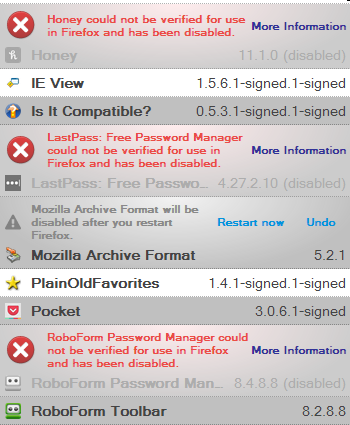
All of a sudden, I get a message that one or more installed add-ons can't be verified & has been disabled. However, they seem to still work. But I get the message shown below every time I launch Firefox. This just started happening last week.
I've shown a picture of some of the "disabled" add-ons. However, I know for sure that Roboform is still working.
How can I get rid of these messages? Thank you in advance!

Выбранное решение
There has been an unfortunate issue with an intermediate certificate that had expired recently and this certificate was used to verify the signatures of extensions hosted on the Add-ons website. This expired certificate caused Firefox to distrust and disable all installed extensions. There have been Firefox updates released to address this issue (66.0.4 and 60.6.2 ESR),see:
- Help -> About Firefox
Users of older (unsupported) Firefox versions will have to install this new intermediate certificate manually via other ways for now.
- /questions/1258208 plugins could not be verified firefox esr 52
- /questions/1258275 How do I re-enable the add-ons WITHOUT being forced to upgrade
See also Mozilla Add-ons on Twitter:
Прочитайте этот ответ в контексте 👍 1Все ответы (3)
Выбранное решение
There has been an unfortunate issue with an intermediate certificate that had expired recently and this certificate was used to verify the signatures of extensions hosted on the Add-ons website. This expired certificate caused Firefox to distrust and disable all installed extensions. There have been Firefox updates released to address this issue (66.0.4 and 60.6.2 ESR),see:
- Help -> About Firefox
Users of older (unsupported) Firefox versions will have to install this new intermediate certificate manually via other ways for now.
- /questions/1258208 plugins could not be verified firefox esr 52
- /questions/1258275 How do I re-enable the add-ons WITHOUT being forced to upgrade
See also Mozilla Add-ons on Twitter:
It looks that there is a system Add-on planned for older Firefox version that do not support the hotfix.
- Bug 1549604 - ship legacy system add-ons to remediate armagadd-on 2.0
(please do not comment in bug reports
https://bugzilla.mozilla.org/page.cgi?id=etiquette.html)
cor-el said
There has been an unfortunate issue with an intermediate certificate that had expired recently and this certificate was used to verify the signatures of extensions hosted on the Add-ons website. This expired certificate caused Firefox to distrust and disable all installed extensions. There have been Firefox updates released to address this issue (66.0.4 and 60.6.2 ESR),see:Users of older (unsupported) Firefox versions will have to install this new intermediate certificate manually via other ways for now.
- Help -> About Firefox
See also Mozilla Add-ons on Twitter:
- /questions/1258208 plugins could not be verified firefox esr 52
- /questions/1258275 How do I re-enable the add-ons WITHOUT being forced to upgrade
Thank you @cor-el!! The answers at this link worked! I appreciate your time & expertise!