

Эта тема была архивирована.
Если вам нужна помощь, задайте новый вопрос.

Архивировано
How do I achieve this particular view in all my mail folders?
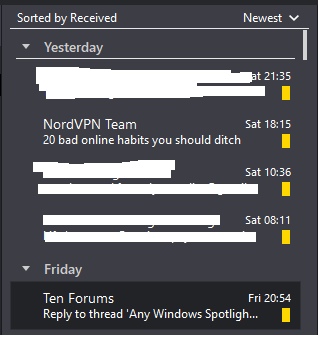
Please let me know how to get the same view as the uploaded image in TB? So, basically all the mails in TB should be: a. Sorted by Received Date (Today, Yesterday, Friday etc.) b. The mails should display the sender name on top with subj line below
Please let me know how to get the same view as the uploaded image in TB?
So, basically all the mails in TB should be:
a. Sorted by Received Date (Today, Yesterday, Friday etc.)
b. The mails should display the sender name on top with subj line below
Все ответы (2)
Ref image attached
Okay, I see. Good to see this feature has been requested already. Thanks for your response.