


With multiple tabs open pressing close button closes firefox without asking for confirmation

I am using Firefox 57 on Linux. With multiple tabs open pressing the close button or Ctrl+Q closes Firefox. Confirmation dialog box does not appear at all. Its a huge regression.
Все ответы (13)
Go to Preferences and check the When Firefox starts option. What you got?
TyDraniu said
Go to Preferences and check the When Firefox starts option. What you got?
I have set it to "Show your windows and tabs from last time". Why you are asking such an irrelevant question?
prasannatsm said
I have set it to "Show your windows and tabs from last time". Why you are asking such an irrelevant question?
In this case there's no confirmation box. There's no need to confirm exit, when your tabs are to be returned in the next session.
TyDraniu said
prasannatsm saidI have set it to "Show your windows and tabs from last time". Why you are asking such an irrelevant question?In this case there's no confirmation box. There's no need to confirm exit, when your tabs are to be returned in the next session.
How can that be assumed? It was asked in the previous versions and users were using it as a feature. Now it is removed. I consider it as a regression.
No, this behaviour was introduced about 50 versions ago.
Perhaps your confirmation box was delivered by some extension, which is not compatible with recent version.
There is a pref in about:config <--- type that in the Address Bar.
browser.tabs.warnOnClose --- double-click the pref to toggle it to true
true is the default setting, but when warning message that appears about closing multiple tabs and the user accidentally clicks don't show this message again that pref will get changed to false
the-edmeister said
There is a pref in about:config <--- type that in the Address Bar. browser.tabs.warnOnClose --- double-click the pref to toggle it to true true is the default setting, but when warning message that appears about closing multiple tabs and the user accidentally clicks don't show this message again that pref will get changed to false
I already double checked browser.tabs.warnOnClose is set to true before asking here. Even now it is set to true. But on pressing close button with multiple tabs I am not seeing confirmation dialog.
TyDraniu said
No, this behaviour was introduced about 50 versions ago. Perhaps your confirmation box was delivered by some extension, which is not compatible with recent version.
In previous versions pressing the close button would ask for the confirmation dialog but ctrl + Q did not. Being a long time Firefox user I am sure it is not due to some extension. May be older version had some bug.
But this version is definitely not behaving as expected.
Two years ago I copied the following from the Firefox's sources:
// There are several cases where we won't show a dialog here: // 1. There is only 1 tab open in 1 window // 2. The session will be restored at startup, indicated by // browser.startup.page == 3 or browser.sessionstore.resume_session_once == true // 3. browser.warnOnQuit == false // 4. The browser is currently in Private Browsing mode // 5. The browser will be restarted. // // Otherwise these are the conditions and the associated dialogs that will be shown: // 1. aQuitType == "lastwindow" or "quit" and browser.showQuitWarning == true // - The quit dialog will be shown // 2. aQuitType == "lastwindow" && browser.tabs.warnOnClose == true // - The "closing multiple tabs" dialog will be shown // // aQuitType == "lastwindow" is overloaded. "lastwindow" is used to indicate // "the last window is closing but we're not quitting (a non-browser window is open)" // and also "we're quitting by closing the last window".
TyDraniu said
Two years ago I copied the following from the Firefox's sources: // There are several cases where we won't show a dialog here: // 1. There is only 1 tab open in 1 window // 2. The session will be restored at startup, indicated by // browser.startup.page == 3 or browser.sessionstore.resume_session_once == true // 3. browser.warnOnQuit == false // 4. The browser is currently in Private Browsing mode // 5. The browser will be restarted. // // Otherwise these are the conditions and the associated dialogs that will be shown: // 1. aQuitType == "lastwindow" or "quit" and browser.showQuitWarning == true // - The quit dialog will be shown // 2. aQuitType == "lastwindow" && browser.tabs.warnOnClose == true // - The "closing multiple tabs" dialog will be shown // // aQuitType == "lastwindow" is overloaded. "lastwindow" is used to indicate // "the last window is closing but we're not quitting (a non-browser window is open)" // and also "we're quitting by closing the last window".
I think there could be some logic error or precedence error. But I am sure that the behavior has changed in this version and it is not what an user would expect. Appreciate if that is changed.
prasannatsm said
I am using Firefox 57 on Linux. With multiple tabs open pressing the close button or Ctrl+Q closes Firefox. Confirmation dialog box does not appear at all. Its a huge regression.
Does your FF have this showing with the Red Arrow if so that would mean any "x" would close everything on the Browser without warning.
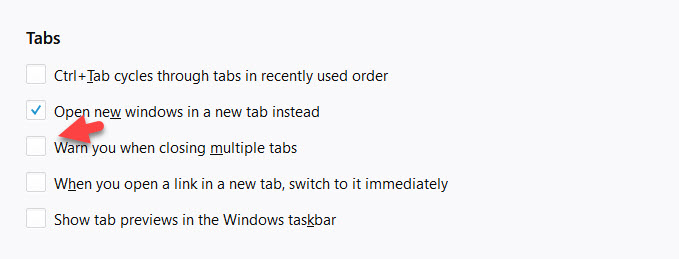
You only see the tab close settings when the current setting isn't the default (these settings are normally hidden).
The Tab warn items in "Options/Preferences > General" are hidden when the related prefs have the default value and warnings are enabled. They only show when you set the related prefs on the about:config page to true. Note that this requires to close and restart Firefox to make changes apply fully.
- "Warn me when closing multiple tabs" (browser.tabs.warnOnClose: true)
- "Warn me when opening multiple tabs might slow down Firefox" (browser.tabs.warnOnOpen: true)
See also:
- browser.showQuitWarning
- browser.warnOnQuit
- browser.tabs.warnOnCloseOtherTabs
cor-el said
You only see the tab close settings when the current setting isn't the default (these settings are normally hidden). The Tab warn items in "Options/Preferences > General" are hidden when the related prefs have the default value and warnings are enabled. They only show when you set the related prefs on the about:config page to true. Note that this requires to close and restart Firefox to make changes apply fully.See also:
- "Warn me when closing multiple tabs" (browser.tabs.warnOnClose: true)
- "Warn me when opening multiple tabs might slow down Firefox" (browser.tabs.warnOnOpen: true)
- browser.showQuitWarning
- browser.warnOnQuit
- browser.tabs.warnOnCloseOtherTabs
All set to true. Still I face the problem.