


how do I change font size and boldness for tile bars and menu?

I don't remember how to change font size and boldness for title bars,menus, etc.
Выбранное решение
gingin said
i hate the same stupid problem and here is the solution i downloaded Theme Font & Size Changer as add-on/extension and you get an icon on the right side which let's you zoom/enlarge your menu bar/bookmarks/tab fonts!!!! just searh for it under tools - add-ons - extensions and type the name on the searh bar on the top right and install. you don't even have to reset your browser it's instant!
See my first post :
https://addons.mozilla.org/en-gb/firefox/addon/theme-font-size-changer/
Apparantly it's not what the OP is looking for ......
Все ответы (6)
Hi !
Maybe you'd like to give this add-on a try, which lets you change the weight to bold and change the font :
https://addons.mozilla.org/en-gb/firefox/addon/theme-font-size-changer/
Thanks Happy 112, I'll give that add-on a try. What happened to this Windows program "Change only the text size" in the display settings?
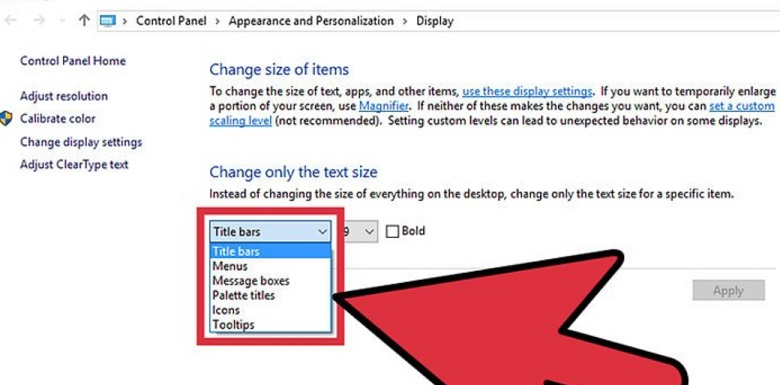
Изменено wwataber
wwataber said
What happened to this Windows program "Change only the text size" in the display settings?
Maybe you'd like to post this question on the Microsoft support forum, which is pretty similar to this forum:
wwataber said
What happened to this Windows program "Change only the text size" in the display settings?
Do you mean that Firefox is ignoring that value? Firefox has its own internal themes which may override those settings.
i hate the same stupid problem and here is the solution i downloaded Theme Font & Size Changer as add-on/extension and you get an icon on the right side which let's you zoom/enlarge your menu bar/bookmarks/tab fonts!!!!
just searh for it under tools - add-ons - extensions and type the name on the searh bar on the top right and install. you don't even have to reset your browser it's instant!
Выбранное решение
gingin said
i hate the same stupid problem and here is the solution i downloaded Theme Font & Size Changer as add-on/extension and you get an icon on the right side which let's you zoom/enlarge your menu bar/bookmarks/tab fonts!!!! just searh for it under tools - add-ons - extensions and type the name on the searh bar on the top right and install. you don't even have to reset your browser it's instant!
See my first post :
https://addons.mozilla.org/en-gb/firefox/addon/theme-font-size-changer/
Apparantly it's not what the OP is looking for ......