


Calendar Has Disappeared Completely

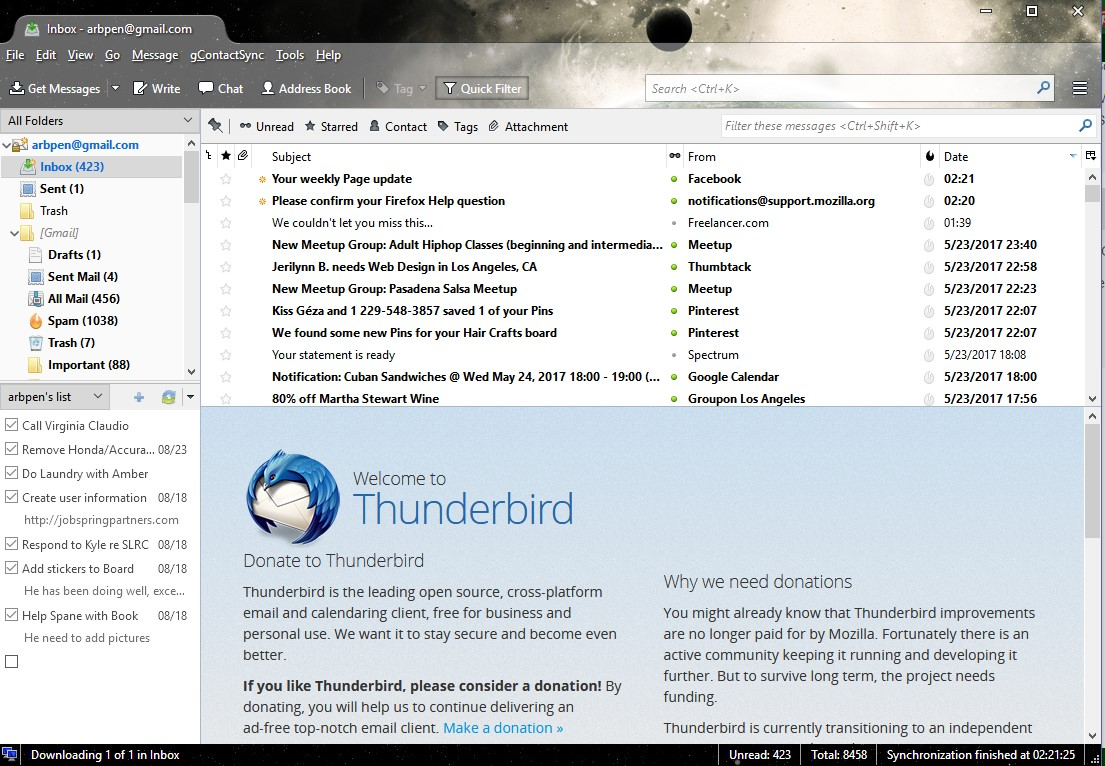
I am running Windows 10 and I had to do a system restore when my computer got funky today. After everything was restored, Thunderbird lost the calendar tab completely. I am pasting the Thunderbird information below and a screenshot of the missing tab. I sync the calendar with Google Calendar, and I really, really need it back. I have tried opening Thunderbird in safe mode, I have downloaded it and reinstalled it, I have deleted it completely, and reinstalled it, to no avail.
Application Basics
   Name: Thunderbird
   Version: 52.1.1
   User Agent: Mozilla/5.0 (Windows NT 10.0; WOW64; rv:52.0) Gecko/20100101 Thunderbird/52.1.1
   Profile Folder: Open Folder
             (Local drive)
   Application Build ID: 20170509142926
   Enabled Plugins: about:plugins
   Build Configuration: about:buildconfig
   Memory Use: about:memory
   Profiles: about:profiles
 Mail and News Accounts
   account1:
     INCOMING: account1, , (imap) imap.gmail.com:993, SSL, OAuth2
     OUTGOING: , smtp.gmail.com:465, SSL, OAuth2, true
   account2:
     INCOMING: account2, , (none) Local Folders, plain, passwordCleartext
   account3:
     INCOMING: account3, , (imap) mobile.charter.net:993, SSL, passwordCleartext
     OUTGOING: , mobile.charter.net:587, SSL, passwordCleartext, true
Crash Reports
 Extensions
   gContactSync, 2.0.12, true, gContactSync@pirules.net
   Google Tasks Sync, 0.5.3, true, google_tasks_sync@tomasz.lewoc
   Lightning, 5.4.1.1, true, {e2fda1a4-762b-4020-b5ad-a41df1933103}
   Lightning Calendar Tabs, 1.5, true, lightningcalendartabs@jlx.84
   Provider for Google Calendar, 3.3, true, {a62ef8ec-5fdc-40c2-873c-223b8a6925cc}
Important Modified Preferences
Name: Value
     accessibility.lastLoadDate: 1495214025
     browser.cache.disk.capacity: 358400
     browser.cache.disk.filesystem_reported: 1
     browser.cache.disk.smart_size_cached_value: 358400
     browser.cache.disk.smart_size.first_run: false
     browser.cache.disk.smart_size.use_old_max: false
     dom.apps.reset-permissions: true
     extensions.lastAppVersion: 52.1.1
     font.internaluseonly.changed: true
     font.name.monospace.el: Consolas
     font.name.monospace.x-cyrillic: Consolas
     font.name.monospace.x-unicode: Consolas
     font.name.monospace.x-western: Consolas
     font.name.sans-serif.el: Calibri
     font.name.sans-serif.x-cyrillic: Calibri
     font.name.sans-serif.x-unicode: Calibri
     font.name.sans-serif.x-western: Calibri
     font.name.serif.el: Cambria
     font.name.serif.x-cyrillic: Cambria
     font.name.serif.x-unicode: Cambria
     font.name.serif.x-western: Cambria
     font.size.fixed.el: 14
     font.size.fixed.x-cyrillic: 14
     font.size.fixed.x-unicode: 14
     font.size.fixed.x-western: 14
     font.size.variable.el: 17
     font.size.variable.x-cyrillic: 17
     font.size.variable.x-unicode: 17
     font.size.variable.x-western: 17
     mail.openMessageBehavior.version: 1
     mail.winsearch.firstRunDone: true
     mailnews.database.global.datastore.id: bd72bf49-5948-41ac-a0bd-6118995ca73
     mailnews.database.global.views.conversation.columns: {"threadCol":{"visible":true,"ordinal":"1"},"flaggedCol":{"visible":true,"ordinal":"3"},"attachmentCol":{"visible":false…
     mailnews.database.global.views.global.columns: {"threadCol":{"visible":true,"ordinal":"1"},"flaggedCol":{"visible":true,"ordinal":"3"},"attachmentCol":{"visible":false…
     media.gmp.storage.version.observed: 1
     network.cookie.prefsMigrated: true
     network.predictor.cleaned-up: true
     places.database.lastMaintenance: 1495591383
     places.history.expiration.transient_current_max_pages: 122334
     plugin.importedState: true
     security.sandbox.content.tempDirSuffix: {836f9174-8c76-47a4-8bc6-6048edb6e330}
Graphics
     GPU #1
     Description: Intel(R) HD Graphics 4000
     Vendor ID: 0x8086
     Device ID: 0x0166
     RAM: Unknown
     Drivers: igdumdim64 igd10iumd64 igd10iumd64 igdumdim32 igd10iumd32 igd10iumd32
     Driver Version: 10.18.10.4425
     Driver Date: 4-4-2016
     Features
     Direct2D: false
     DirectWrite: true (10.0.16188.1000)
     WebGL Renderer: Google Inc. -- ANGLE (Intel(R) HD Graphics 4000 Direct3D9Ex vs_3_0 ps_3_0) -- OpenGL ES 2.0 (ANGLE 2.1.0.2a250c8a0e15)
     AzureCanvasBackend: skia
     AzureCanvasAccelerated: 0
     AzureFallbackCanvasBackend: cairo
     AzureContentBackend: skia
JavaScript
Incremental GC: 1
Accessibility
   Activated: 0
   Prevent Accessibility: 0
Library Versions
     Expected minimum version
     Version in use
     NSPR
     4.13.1
     4.13.1
     NSS
     3.28.4
     3.28.4
     NSS Util
     3.28.4
     3.28.4
     NSS SSL
     3.28.4
     3.28.4
     NSS S/MIME
     3.28.4
     3.28.4
Выбранное решение
Fixed! I uninstalled Lightning, and all the other addins I had, the reinstalled them one by one. My calendar is back!
Прочитайте этот ответ в контексте 👍 0Все ответы (2)
I could not attach the screen shot in the initial post. Here is a screen shot showing the tab completely missing.
Выбранное решение
Fixed! I uninstalled Lightning, and all the other addins I had, the reinstalled them one by one. My calendar is back!