


How to change sorting order in autofill dropdowns?

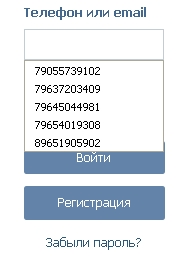
After upgrade to FireFox 42.0 I've got an annoying new feature: the sorting order of items in autofill dropdown lists has changed. It is not the conventional order anymore. Now it goes by alphabet, but I want it to be date entered order, so the oldest entry is the first and the newest entry is the last one.
So the questing is how to change the sorting to its normal behaviuor? NOTE: I need to change sorting order in dropdowns which browser provides for input boxes on web pages, that's all.
Thanks in advance.
Все ответы (3)
There are browser.formfill.* prefs that set some features.
From what I understand the sorting is based is frecency (frequency and recency) just like with the location/address bar. So if you use entries more often then they should bubble to the top. You can check the formhistory.sqlite file in the SQLite Manager extension.
See also:
Found a duplicate question:
Изменено cor-el
cor-el said
There are browser.formfill.* prefs that set some features. From what I understand the sorting is based is frecency (frequency and recency) just like with the location/address bar. So if you use entries more often then they should bubble to the top. You can check the formhistory.sqlite file in the SQLite Manager extension. See also:
Found a duplicate question:
Thanks for the answer, but all I need is to change the current order to the previous one if it's actually possible. What do I need to do? If you coudl tell it me, I would be very grateful.
The problem has been solved going back to the previous version.