


Not running properly.

Firefox only loads the outer boarder, no https bar, no menus nothing just the outer boarder. Have tried uninstalling and reinstalling to no avail.
Please help.
Выбранное решение
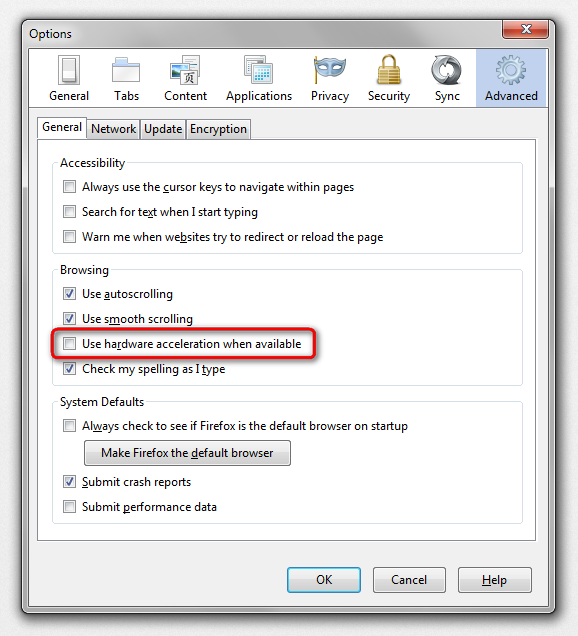
hello lhill123, maybe that's an issue with hardware acceleration - first please try updating your graphics driver, or in case this doesn't solve the issue or there is no new version available at the moment, start firefox into safemode by pressing the shift key while the application is launching & disable hardware acceleration in the firefox menu ≡ > options > advanced > general (that setting will take a restart of the browser to take effect).
Troubleshoot extensions, themes and hardware acceleration issues to solve common Firefox problems
Прочитайте этот ответ в контексте 👍 2Все ответы (3)
Выбранное решение
hello lhill123, maybe that's an issue with hardware acceleration - first please try updating your graphics driver, or in case this doesn't solve the issue or there is no new version available at the moment, start firefox into safemode by pressing the shift key while the application is launching & disable hardware acceleration in the firefox menu ≡ > options > advanced > general (that setting will take a restart of the browser to take effect).
Troubleshoot extensions, themes and hardware acceleration issues to solve common Firefox problems
thanks philipp. disabling hardware acceleration fixed it straight away.
thanks for reporting back, could you go to the firefox menu ≡ > help ? > troubleshooting information, copy the contents of that page and paste them here into a reply on the forum? this might be very useful in order to find out what was going on and maybe to develop a fix for other affected users. thank you!