Эта тема была архивирована.
Если вам нужна помощь, задайте новый вопрос.

Архивировано
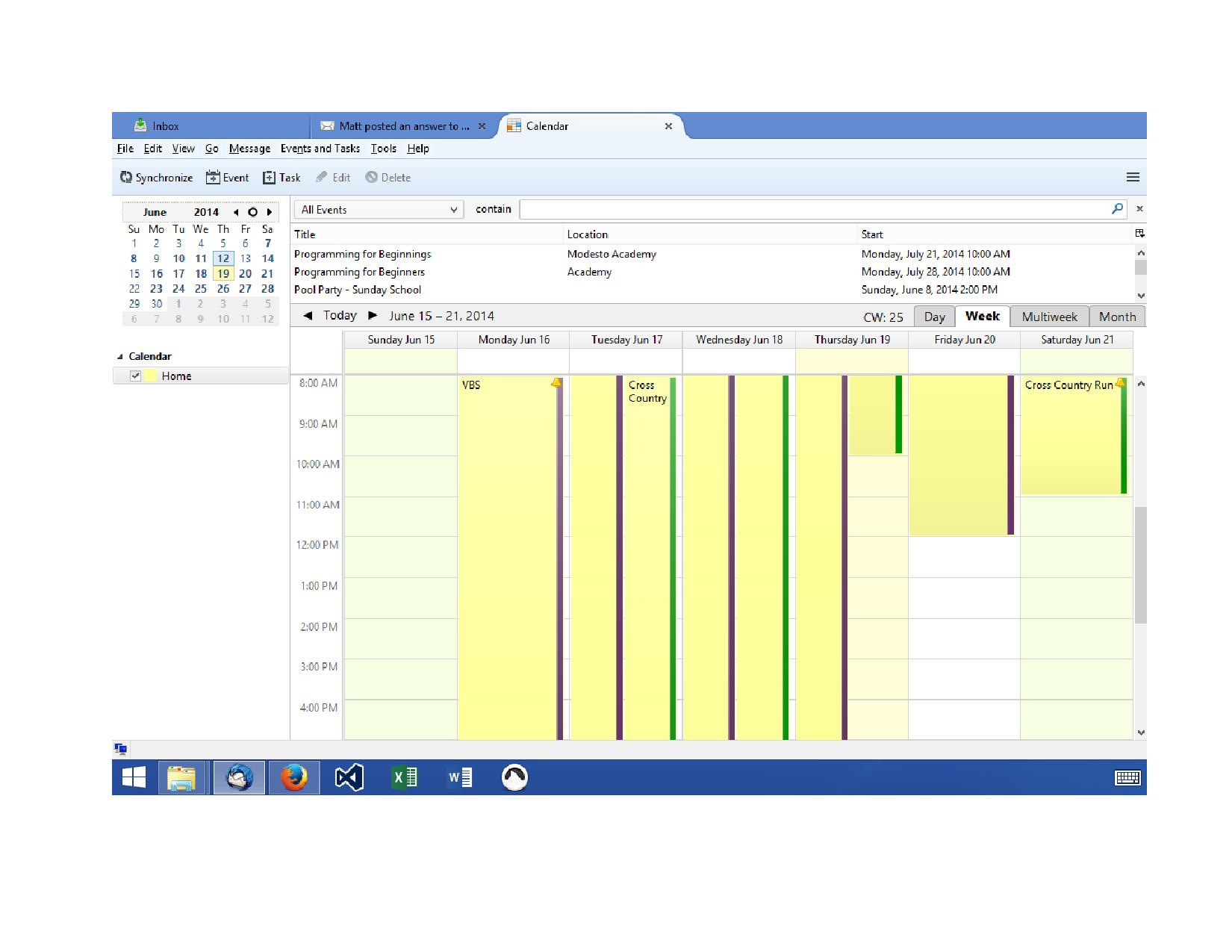
Why doesn't the category color show for the entire width of the appointment's date?

I only see a small sliver of color on the right of an appointment. I see screen shots online of the calendar and it seems to me that the whole background of each appointment should be filled with the category's color. Is this something I need to do? Or that can be done?
I only see a small sliver of color on the right of an appointment. I see screen shots online of the calendar and it seems to me that the whole background of each appointment should be filled with the category's color. Is this something I need to do? Or that can be done?
Все ответы (2)
are you using a non default theme with Thunderbird? Restart Thunderbird with add-ons disabled (Thunderbird Safe Mode). On the Help menu (alt+H), click on "Restart with Add-ons Disabled".
After restarting Thunderbird with Add-ons disabled, I see no change in how the category color is displayed. Please see my attached screen shot of my Thunderbird calendar.