


In FF 25 on XP there was a star to left of navigation toolbar to open bookmarks sidebar, now it's on the right, but does not open the sidebar - what's up?
I want that little star back that opens the bookmarks sidebar. It's just to the left of the address field on XP in FP 25. But on Windows 8 in FP 25.0.1 it's not there. Instead there's a star that sometimes appears on the right of the address bar. But the star on the right does not open the bookmarks sidebar. It only displays a list of bookmarks and options, which do not include opening the sidebar. Has this option been removed and replaced with Ctrl B?
Soluție aleasă
Thanks. I'm not sure what happened but somewhere in the midst of working with Classic Theme Restorer, I came across Classic Toolbar Buttons 1.4 and found the icon and figured out how to put it up there.
Citește răspunsul în context 👍 0Toate răspunsurile (6)
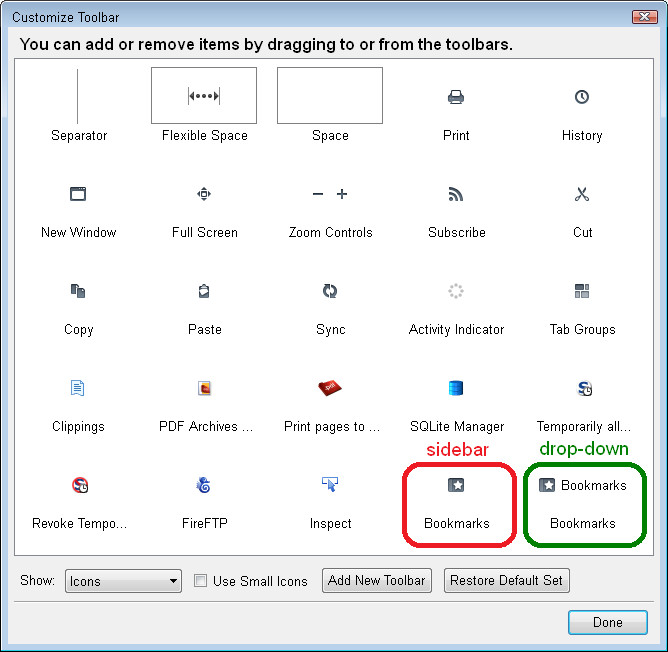
There are two different icons with the star: one opens a drop-down menu and the other opens the sidebar. When you're in the Customize mode, the difference is that the menu one has the word Bookmarks next to it, while the sidebar one just has the image. (Screen shot -- yours are likely not next to one another like this, but mixed in with other icons)
Hopefully you can make the switch successfully. If the other star button is missing, you can try using the "Restore default set" button in the Customize dialog.
Thanks. What was necessary to get what I wanted was to drag that button to the left of the bar. Oddly enough, the icon I dragged to the right has since disappeared and is not available even when I reset. However, I don't need it.

@ jscher2000 Thanks for trying.........I could not see your screenshot, way too small, I did try Zoom, 5 times, still could not distinguish one Star from the other.... I am using Windows XP Pro 32 Bit I do not want to go default again, last time it took me 3 hours to get it all back into some reasonable order. Not happy with the person who thought this was a good idea, it seemed to be working ok, why fix something that wasn't broken? I DO NOT like the new look....but I guess I will get used to it eventually, but I want my STAR back. I have the drop down one, but the one I use a LOT DAILY has gone.... Thanks Sylvia
Well, now in Firefox 29 it's gone again and I can't get it back. Who's in charge of this place?
You can look at the Classic Theme Restorer extension to restore some functionality that was lost with the arrival of the Australis style in Firefox 29. This includes toolbar icons to open the bookmarks and the history in the sidebar.
- Classic Theme Restorer: https://addons.mozilla.org/firefox/addon/classicthemerestorer/
You can check the settings of the CTR extension via its Options/Preferences button on the "Firefox/Tools > Add-ons > Extensions" page.
See also:
Soluție aleasă
Thanks. I'm not sure what happened but somewhere in the midst of working with Classic Theme Restorer, I came across Classic Toolbar Buttons 1.4 and found the icon and figured out how to put it up there.