


Cannot find my book marks since my computer was fixed after crash.

My computer has crashed and I took it into a computer company and they had to wipe the computer clean. They had saved documents & pictures things like that. But when I got back on Mozilla firefox found out my bookmarks were gone. Is there anyway I can get them back?
Toate răspunsurile (2)
We're sorry to hear that Firefox is crashing. In order to assist you better, please follow the steps below to provide us crash ID's to help us learn more about your crash.
- Enter about:crashes in the address bar (that's where you enter your website URL) and press Enter. You should now see a list of submitted crash reports.
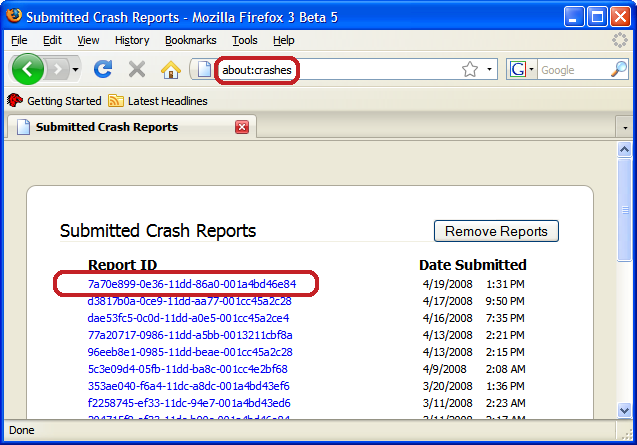
- Copy the 5 most recent crash ID's that you see in the crash report window and paste them into your response here.
Thank you for your help!
More information and further troubleshooting steps can be found in the Troubleshoot Firefox crashes (closing or quitting unexpectedly) article.
The Firefox profile folder is in a hidden location.
- C:\Users\<user>\AppData\Roaming\Mozilla\Firefox\Profiles\<profile>\
- http://kb.mozillazine.org/Profile_folder_-_Firefox
The "Application Data" folder in XP/Win2K and the "AppData" folder in Windows Vista and Windows 7 and later versions are hidden folders.