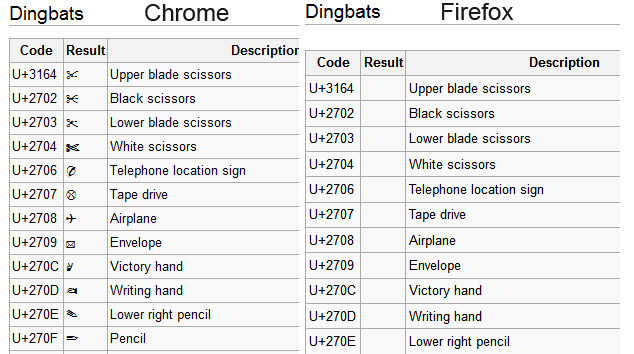
Symbols show up in Internet Explorer but not Firefox, how do I fix this?

Symbols like ♡ or ★ (both of which I copy and pasted and can't see at all, they are just empty spaces without hex codes). I've installed the dejavu and symbola fonts but most symbols still do not show up. I tried checking on Internet Explorer and they show up there but not on Firefox, is there some way to fix this? Thank you.
Toate răspunsurile (7)
That should be working with those two fonts installed.
Does it help if you temporarily set a font like Verdana or Arial as the default font and disable website fonts?
- Tools > Options > Content : Fonts & Colors > Advanced : [ ] "Allow pages to choose their own fonts, instead of my selections above"
I've tried that as well and the symbols still do not show up.
Do HTML entity codes like ♥ (♥) and ♠ (♠) not work as well?
You can try to set the pref gfx.font_rendering.directwrite.use_gdi_table_loading to false on the about:config page.
HTML codes show up so I can see the hearts and spades etc. I just tried setting the pref to false and still nothing, anything else I can try? Thank you for the help.
Does anyone have a solution for this?
Do you see any symbols here?
Having this problem too. I just purchased a new laptop 2-3 weeks ago: Windows 7, 64-bit, currently running FF 7.0.1. Both IE9 and Chrome display with no trouble.
http://en.wikipedia.org/wiki/List_of_Unicode_characters Most of the language tables are fine and the hex code boxes show up like they should for fonts I don't have versus just being blank. I see a TON of blank cells once I get to the Mathematical Operators table (~20% filled). Geometric Shapes is pretty sparse and there's almost nothing in Dingbats. I've verified that these are not blank in other browsers.
Is this likely a FF7 bug? My previous laptop had no issues displaying these characters and I don't think I had updated from FF6 before switching to the new laptop.