


When I open a new tab it no longer pulls up my default homepage

I have my homepage set to google. When I used to open a new tab it would go directly to google. Now it opens up to a blank page and the title on the new tab is "new tab". How do I fix this?
I have my homepage set to google. When I used to open a new tab it would go directly to google. Now it opens up to a blank page and the title on the new tab is "new tab". How do I fix this?
Toate răspunsurile (4)
You may have been using an add-on to fill the blank tab. If your old add-on isn't compatible with Firefox 5, you can try this one:
Thanks for your reply. I installed the add on, but it didn't work. Any other suggestions?
Sorry, I forgot to mention that you need to go into the extension's options to set the URL.
orange Firefox button or Tools menu > Add-ons
On the left side, click Extensions, then look for the button circled in the attached screen shot.
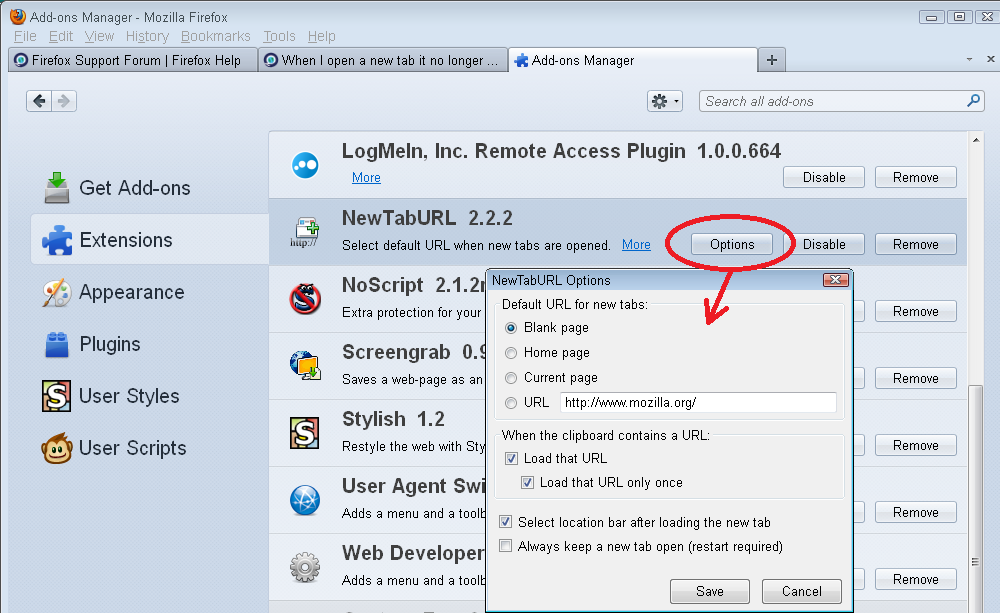
Modificat la de jscher2000 - Support Volunteer
Thanks so much! You're Awesome!