Windows 10 reached EOS (end of support) on October 14, 2025. If you are on Windows 10, see this article.

Caută ajutor

Atenție la excrocheriile de asistență. Noi nu îți vom cere niciodată să suni sau să trimiți vreun SMS la vreun număr de telefon sau să dai informații personale. Te rugăm să raportezi activitățile suspecte folosind opțiunea „Raportează un abuz”.

Află mai multe
Arhivate

Problem: Bookmark sync only works in one direction

larienna

I have 2 computer, computer A has vista and computer B is a netbook with XP. The problem is that the bookmark sycn only works in one direction.

For example: both my computer has the same book marks (previously sync with X-mark which is now disabled). I decided to do some clean up on computer B. If Y sync computer A, nothing happens, but when I sync computer B, all the cleanup I made has been undone since computer A override all the changes I made to B.

In other words, the changes I made to B can never be applied to A.

I have 2 computer, computer A has vista and computer B is a netbook with XP. The problem is that the bookmark sycn only works in one direction. For example: both my computer has the same book marks (previously sync with X-mark which is now disabled). I decided to do some clean up on computer B. If Y sync computer A, nothing happens, but when I sync computer B, all the cleanup I made has been undone since computer A override all the changes I made to B. In other words, the changes I made to B can never be applied to A.

Toate răspunsurile (1)

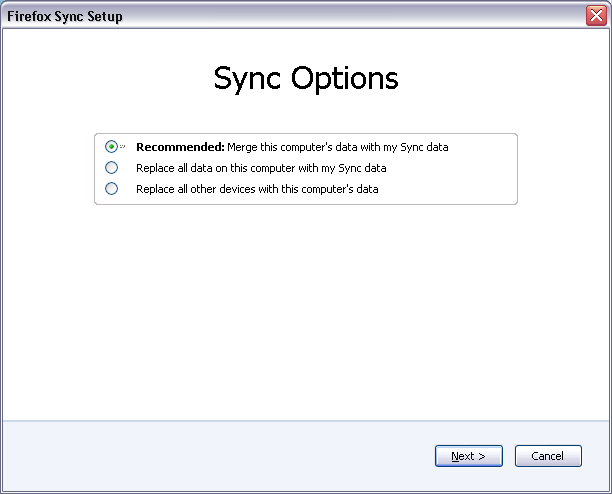
When you're doing a "clean-up" like that you need to use Reset Sync in Tools > Options > Sync - Current Account = Manage Account and use the Replace all other devices with this computer's data option. See the attached screenshot - use the third option.