Firul de discuție a fost arhivat.
Adresează o întrebare nouă dacă ai nevoie de ajutor.

Arhivate
My computer opens to Babylon search instead of Mozilla/Google and I have lost the tool bar at the top of the screen....favorites, file, etc.

I downloaded a program to convert currency called Babylon. Asked if I wanted it to be my search engine and I said no. After using the program I decided to uninstall. Now when I open Mozilla Firefox, it opens to a Babylon search page and my tool bar at the very top of the screen where I click on File, Tools, Favorites is gone. What can I do?
I downloaded a program to convert currency called Babylon. Asked if I wanted it to be my search engine and I said no. After using the program I decided to uninstall. Now when I open Mozilla Firefox, it opens to a Babylon search page and my tool bar at the very top of the screen where I click on File, Tools, Favorites is gone. What can I do?
Toate răspunsurile (1)
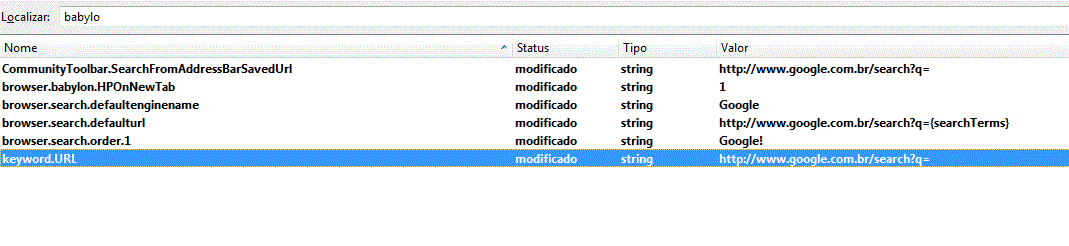
I only could change it by going to "about:config" page (type it on the address bar) and changing there like suggested here:
http://www.clickonf5.org/software/change-default-search-engine-firefox-browser/6862
I searched for "babylon" and changed the links and titles to google