


Address book hangs when I click on any entry in it

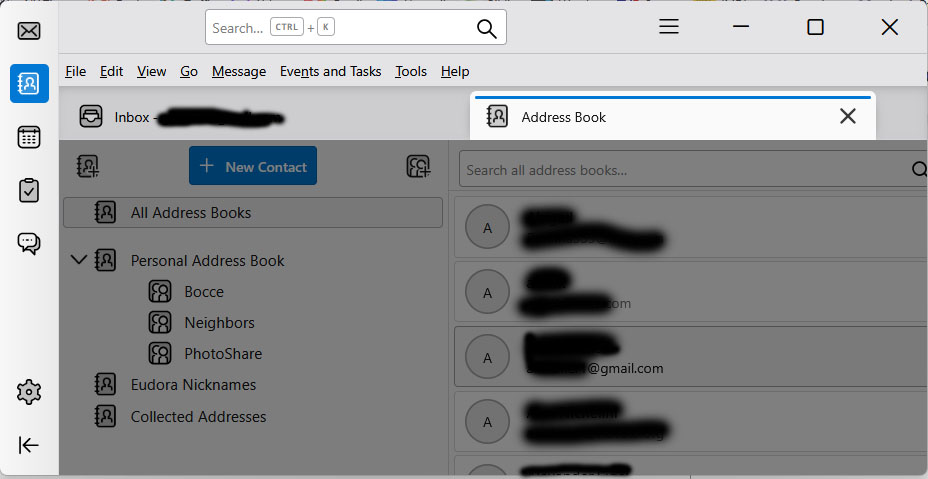
On my Windows 11 PC, when I open my Thunderbird Address Book and click on any entry, or right-click and select any option, a solid grey veneer overlays the Address Book window, and nothing else happens: The feature hangs. I can close the window and continue to use Thunderbird, but all I can do in the Address Book is scroll through the names and email addresses. When this first happened, I updated Thunderbird to release 159.0 (64-bit), but the same thing happens in that version. I've done web and forum searches and have not seen any other reports of this. Any ideas as to why this is happening to me, or how I might fix it? (I've attached a redacted screen image showing what I see.)
Toate răspunsurile (2)
I have found the problem and need to submit a defect report. Can someone tell me how to do that? The problem is that I use a screen resolution of 1280x720 on a 23-inch monitor and the Thunderbird Address Book feature does not display correctly in that mode. If I go full screen I can display an entry and edit it--but I can't save it. The right side of the display cuts off and the Save button does not appear. So the only way to edit and save an entry is to change my screen resolution (this should be readily reproducible). That should not be necessary. Again, can someone advise me how to report this defect to Thunderbird developers? (Or maybe better: work around it without changing my screen resolution!)
I thought we had a bug report for this but didn't find one.
First check that it reproduces in Help > Troubleshoot Mode. If it does, then https://bugzilla.mozilla.org/enter_bug.cgi?product=Thunderbird&component=Address Book