


BBC videos no longer play

Firefox is up to date, Windows 11.
I frequently watch BBC videos but approx one week ago, they stopped playing. I have your VPN which is usually off as it give me no advantage, (this appeared following the last update), but I've tried switching on and changing to UK location. No change.
Can you give me some suggestions please?
Soluție aleasă
Still working on it!
Out of the 8, the videos work if I disable these 4 (yes, ALL 4) .........
Adblock Plus (free) Iobit Surfing Protection and Ad Removal Malwarebytes Browser Guard Privacy Badger
First question is....... I've been using these add-ons for many months so why now?
Second is........ I suppose I can do without all these but is there an alternative I could use? I do need an Ad blocker.
Toate răspunsurile (16)
Hi,
Sorry for the delayed response. Here are some standard troubleshooting steps that may resolve the issue for you:
- Please check if you have Enhanced Tracking Protection (ETP) enabled. You can do that by clicking the shield
 icon in the left part of the address bar.
- If ETP is enabled, try disabling it.
- If the problem is not fixed, try clearing Firefox cache.
- If it does not help, try clearing cookies and data for the website you experience troubles with (warning: you will be logged out on this website).
- If it also does not help, try running Firefox in Troubleshoot Mode. If the problem doesn't persist, please follow the steps from this article to troubleshoot further.
- If nothing from the above helps, try creating a new Firefox profile and check if the issue persists there. If it doesn't, you can start copying files from your old profile to the new one to identify which one causes the issue. See this article on what files to copy.
Does any of the above help? Looking forward to your update on how it goes!
Hi Denys,
Thanks for this. I've worked my way thru' these, down to Troubleshoot in Safe Mode, sorry, Troubleshoot Mode and the videos now play.
I'm not sure what to do next? Is it now an Add-on problem so I will have to delete/restore each one?
Ann
Got it, then the most likely causes are an extension (or a combination of extensions) or hardware acceleration.
You can disable extensions one by one and see when the issue stops reproducing. Just go to the Firefox menu > Extensions and themes, select Extensions at the left, and use switches to disable and reenable extensions.
For more details, please see Troubleshoot extensions, themes and hardware acceleration issues to solve common Firefox problems.
I've disabled each one (only 8) and still not working. Then disabled all of them and it works..................
Going to take a bit longer methinks!
Soluție aleasă
Still working on it!
Out of the 8, the videos work if I disable these 4 (yes, ALL 4) .........
Adblock Plus (free) Iobit Surfing Protection and Ad Removal Malwarebytes Browser Guard Privacy Badger
First question is....... I've been using these add-ons for many months so why now?
Second is........ I suppose I can do without all these but is there an alternative I could use? I do need an Ad blocker.
It's weird that you need to disable all 4 of them (maybe just 2 or 3 is enough?) Anyway, it would be great to report the issue to the extension developers, so that they can fix it.
I personally also had the same issue caused by AdGuard, but I reported it to them, and it is now fixed. Looks like BBC updated their player code recently...
You can contact an extension developers by finding the extension on addons.mozilla.org and clicking Support site / Homepage (if available).
Regarding the alternatives, you can use AdGuard or uBlock Origin until the issue is resolved for your extensions. But you should also be able to just add BBC to exceptions for the ad blockers that you use.
I'll tell you what is weird!
I installed Adguard - fine, then nothing worked. I disabled all the extensions and still no videos.
I uninstalled Adguard and still no videos.
I am really confused now.
Well... Maybe clearing cookies/cache again will help?? But that's indeed extremely weird...
Have I really got to start from scratch? I'll work on it and let you know sometime in the future..........
- (

Same problem with BBC videos here. Turning off Privacy Badger fxed it. However, I used Privacy Badger for a reason...
grantro3 said
Same problem with BBC videos here. Turning off Privacy Badger fxed it. However, I used Privacy Badger for a reason...
Please report the issue to the developers. Given that it's a recommended extension, they should fix it pretty quickly.
My videos stilll don't work whatever is enabled or disabled. I've tried it all ways, and even re-booted every time I made a change. Sometimes it works, sometimes does not, and if it works, then it doesn't work a second time.
I've given up trying to fight it. All my add-ons are now disabled and I'm back to ads......... I think I'm going to enable them all and just live with not viewing the videos. There is no point in reporting all this to the developers as the problem is not consistent.
Thanks for trying guys!

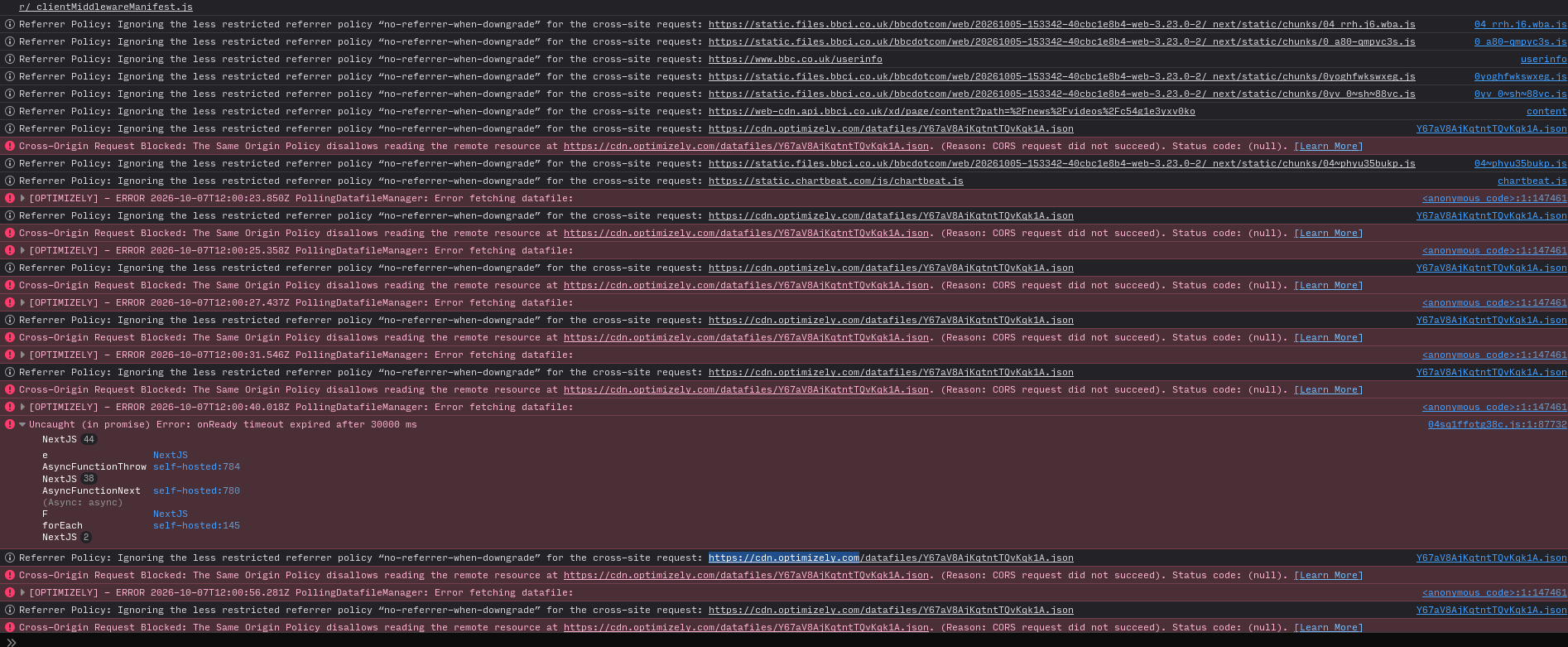
This is still an issue, and happens to me in Private Mode with all extensions disabled. I've submitted a bug report to the BBC (and so can you), with the following:
> Video playback has been broken in Firefox for some time. The video box appears empty except for the play arrow button. On click, the button disappears and nothing else happens. > > In the browser console I see the following errors repeatedly: > > > Cross-Origin Request Blocked: The Same Origin Policy disallows reading the remote resource at https://cdn.optimizely.com/datafiles/Y67aV8AjKqtntTQvKqk1A.json. (Reason: CORS request did not succeed). Status code: (null). > > > > [OPTIMIZELY] - ERROR 2026-10-07T11:55:50.352Z PollingDatafileManager: Error fetching datafile: > > overrideMethod <anonymous code>:1 > NextJS 50 > > After a while, I get the following: > > > Uncaught (in promise) Error: onReady timeout expired after 30000 ms > > NextJS 44 > > 04sq1ffotg38c.js:1:87732 > > e NextJS > > AsyncFunctionThrow self-hosted:784 > > NextJS 38 > > AsyncFunctionNext self-hosted:780 > > (Async: async) > > F NextJS > > forEach self-hosted:145 > > NextJS 2 > > > > (Async: async) > > F NextJS > > forEach self-hosted:145 > > NextJS 2 > > There is at least one thread reporting this issue on the Firefox forums, from three months ago: https://support.mozilla.org/en-US/questions/1586820 > > The video works as expected in Chromium, even using the same VPN connection, so that's not the problem. > > Tested in Waterfox v6.7.5 (64-bit), in Private Browsing mode with all extensions disabled and bbc.co.uk and cdn.optimizely.com whitelisted from Enhanced Tracking Protection.
Cancel that, the videos appear to work in Firefox so I think this is an issue with Waterfox's ETP
Hello Ben,
I don't know what you are cancelling but is Waterfox's ETP anything I can tweak?
Funnily enough, I downloaded an extension yesterday called "Malwarebytes Browser Guard" which seemed like a good idea at the time. This morning, I tried to watch a BBC video (from their front page) and this would not work until I disabled the extension. At least I now know what to do in order for them to play.
Hi Ben,
Your posts are not arriving in sequence so I can now read your lengthy one.