


Unsubscribe specific folder does not work

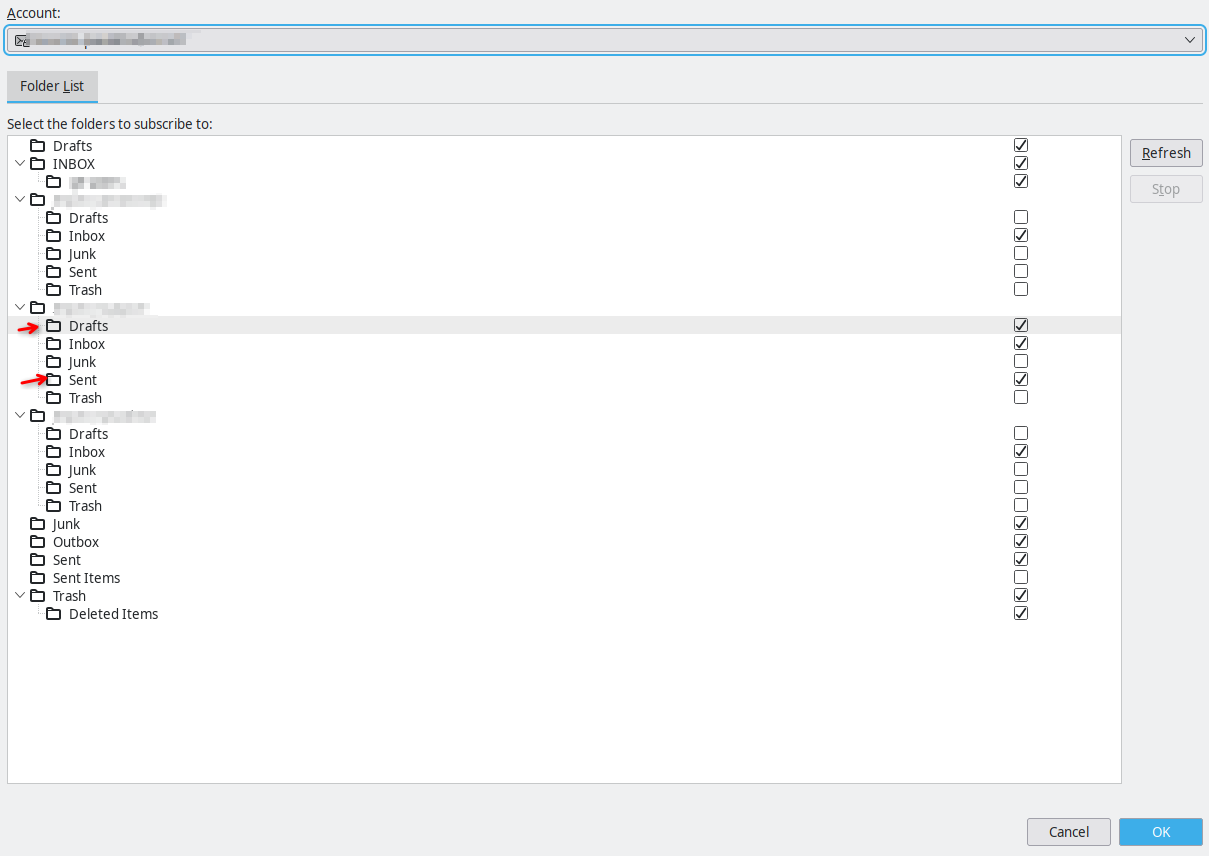
Hello, I have an IMAP acocunt configured, the server is Zimbra and has several shared Inboxes inside my account. Each of these inboxes come with several subfolders (which have the same name in every Inbox), and I would only like to keep some of them displayed in Thunderbird, but the unsubscribe option does not work for a few of them.
I open up the "Subscribe" dialog, I can correctly navigate to the fiolders I want to unsubscribe and click them, which unchecks the mark. I click "Ok" and nothing happens. If I reopen the Subscribe dialog, the folders are checked, as if I did nothing.
Note that I can unsubscribe to most folder, only a couple of them have this problematic behavior.
I have tried enabling/disabling the "Show all folder" option in the Advanced account panel and Enabling/Disabling the local storage for these folders.
I have also tried to unsubscribe the folders, then manually erasing the mbox files and indexes in the account folder before clicking Ok. The msf file are immediately recreated.
In the screenshot, the folders marked with an arrow cannot be unsubscribed, no matter what I tried.
Toate răspunsurile (3)

I can't explain it but here's my experience...
I can unsubscribe from the Draft(s) folder on Gmail and Outlook.
I cannot unsubscribe from Draft(s) on Yahoo, Comcast, or a Roundcube webmail host. It behaves as you describe - you uncheck the box but it doesn't stick.I notice that on Roundcube you are able to Subscribe/Unsubscribe via sliders next to each folder. However, the sliders next to Inbox, Drafts, Sent, Junk, and Trash are grayed out and cannot be moved.
On Comcast web mail, the Inbox, Drafts, Sent, Spam, and Trash folders have no option to Delete, Rename, Move or any other operations that can be applied to your own folders.
My conclusion is that, on some servers, certain folders are intentionally configured to be protected and can't be changed by the user. Probably similar situation on other hosts, too.
Modificat la de Lin
I see that this is a common problem, but I do not see how this could be a *server* problem. My understanding is that the "subscription" toggle is just telling Thunderbird to not fetch the specific folder. In my specific case, there is really nothing special about the Draft and Sent folders, they are not even the Draft and Sent folder of the account, just two subfolders that happen to be called like that.
I agree, but rightly or wrongly, this appears to be how and why it works the way it does. The oldest version of Thunderbird I have is 115.18.0, and it behaves the same way. Whether it's a design decision, a technical limitation, or a bug, I don't know.