


Message retention policy for folders
When a message is removed from a folder via that folders' Retention Policy, is the message permanently deleted or does that message go to Trash? I use Thunderbird with Gmail via POP. Thank you.
Modificat la de DSGraham
Soluție aleasă
DSGraham said
My interests are at the User Level, though, and would like the messages that ARE marked for deletion via the folder Retention Policy to NOT be marked for deletion but rather have the option of moving to Trash. While in Trash, the messages would be accessible as usual by me the user via standard TB user interfaces to Trash.
OK, I understand your point of view. You may submit your proposals/ideas on the following page https://connect.mozilla.org/t5/ideas/idb-p/ideas
Citește răspunsul în context 👍 0Toate răspunsurile (7)
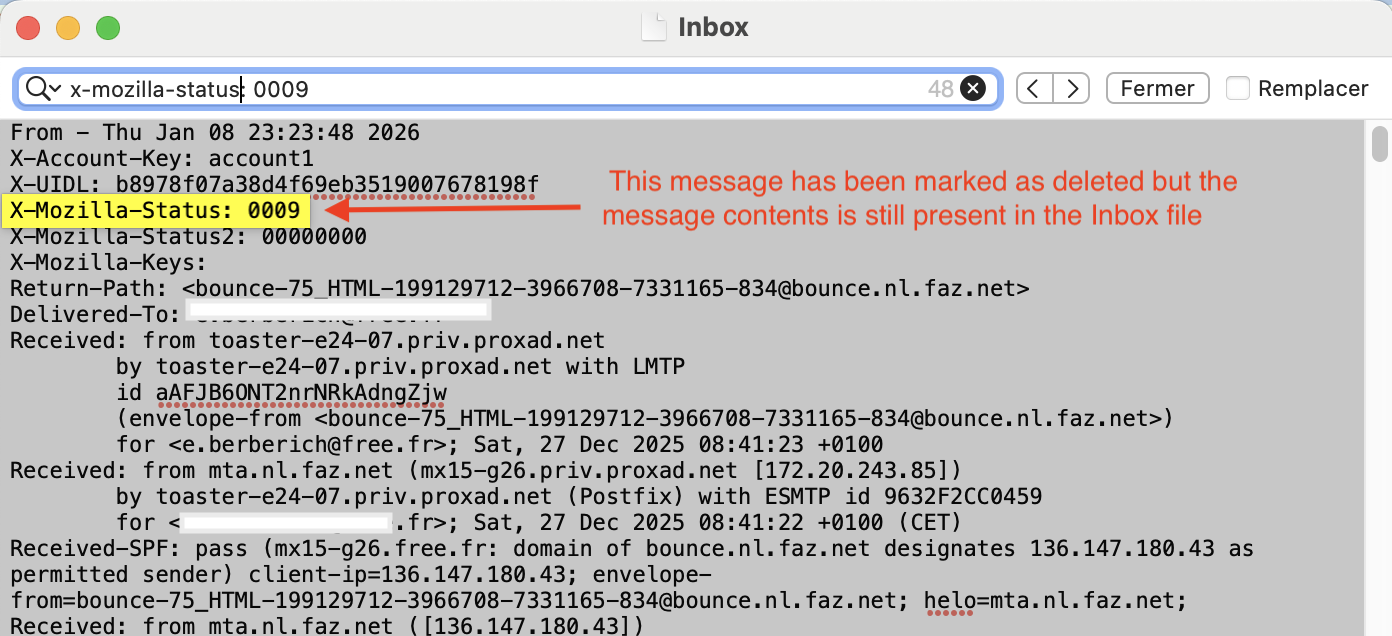
The message is deleted from the folder itself but is not moved to the Trash folder. If you use the standard message store type "File per folder (mbox)" the message is not deleted from the correspondent mailbox file but only marked as deleted with the X-Mozilla Status: 0009
From - Thu Jan 29 19:01:52 2026 X-Mozilla-Status: 0009 X-Mozilla-Status2: 00000000 X-Mozilla-Keys: X-Account-Key: account1
So theoretically it can be restored, either by editing the mbox file in a text editor and changing the X-Mozilla Status from 0009 to 0000, or more easily with the extension "Undelete" https://www.ggbs.de/extensions/Undelete.html Yet as soon the original folder has been compacted - manually or automatically - the message will be wiped out from the mbox file and is definitively gone https://support.mozilla.org/en-US/kb/compacting-folders
Great information, thank you. I would prefer that the message go to Trash which would better fit with how I handle the "aging" of messages. It appears that is not currently a Thunderbird option, I wonder if that would be a major change? Again, thank you for the thorough and timely response!
Email goes to Trash if you manually delete the email.
As you are using POP and gmail, the deleted email cannot be put into the server 'Trash' folder as there is no synchronisation with server folders/labels. That means the email is still being stored on the server and will either be in the server 'Inbox' or the 'Inbox' labe; will have been removed and the email is still in the server 'All Mail' folder.
Gmail stores all emails, incoming and outgoing in the server 'All Mail' folder. Gmail applies 'labels' which are like a type of tag allowing an email stored in 'All Mail' to be displayed in any applied server 'label'.
As a heads up.... It is advisable to logon to your webmail account periodically to properly delete emails that have no label from the 'All Mail' folder and then empty the server Trash. If you do not do this, then emails accumulate and in the end you might find gmail is throttling the number that can get downloaded. The fix is to delete old emails from the 'All Mail' folder.
Toad-Hall said
Email goes to Trash if you manually delete the email. As you are using POP and gmail, the deleted email cannot be put into the server 'Trash' folder as there is no synchronisation with server folders/labels. That means the email is still being stored on the server and will either be in the server 'Inbox' or the 'Inbox' labe; will have been removed and the email is still in the server 'All Mail' folder. Gmail stores all emails, incoming and outgoing in the server 'All Mail' folder. Gmail applies 'labels' which are like a type of tag allowing an email stored in 'All Mail' to be displayed in any applied server 'label'. As a heads up.... It is advisable to logon to your webmail account periodically to properly delete emails that have no label from the 'All Mail' folder and then empty the server Trash. If you do not do this, then emails accumulate and in the end you might find gmail is throttling the number that can get downloaded. The fix is to delete old emails from the 'All Mail' folder.
Thank you for this information. I'm satisfied with what happens on the server; my questions have to do with what happens on the client side with my use of Thunderbird.
Ideally, using a folder Retention Policy would have the deleted messages go to Trash on TB, not be immediately deleted. Since I can't find any description of what happens to messages that are removed from a folder via Retention Policy and I do not see them in Trash, I assume the messages are immediately deleted. I would hope that directing a Retention Policy to Trash might be a simple update to TB although I rely on experts to say.
Regarding All Mail on the Gmail server, I have a Google Apps Script that ages All Mail on the Gmail host and deletes messages in a time frame that works for me.
My bottom line TB questions are: 1) when a folder Retention Policy is in operation, can it be confirmed that the messages can only be deleted and not sent to Trash?; and 2) is a change to have Trash an option for Retention Policy an easy change to TB?
Thank you.
DSGraham said
Ideally, using a folder Retention Policy would have the deleted messages go to Trash on TB, not be immediately deleted. Since I can't find any description of what happens to messages that are removed from a folder via Retention Policy and I do not see them in Trash, I assume the messages are immediately deleted. I would hope that directing a Retention Policy to Trash might be a simple update to TB although I rely on experts to say.
You misunderstood my explanations concerning the fate of messages deleted when automatic folder retention policy is used. Those messages are not immediately wiped out yet only marked as deleted in the X-Mozilla-Status in the message headers (see my image). And as long as the mbox file is not yet compacted - manually or automatically - the deleted message texts are still present in their mbox file and can easily be restored - if wanted - as I've demonstrated recently in this discussion https://support.mozilla.org/en-US/questions/1566083
Modificat la de Mapenzi
Thanks Mapenzi for the additional information. I do appreciate that the messages are marked as deleted rather than wiped out since you shared your knowledge of how TB works. My interests are at the User Level, though, and would like the messages that ARE marked for deletion via the folder Retention Policy to NOT be marked for deletion but rather have the option of moving to Trash. While in Trash, the messages would be accessible as usual by me the user via standard TB user interfaces to Trash. I believe you have confirmed how it works, that I am not missing an option that exists today, and that I should request an added feature for possible future inclusion in TB. Thanks again!
Soluție aleasă
DSGraham said
My interests are at the User Level, though, and would like the messages that ARE marked for deletion via the folder Retention Policy to NOT be marked for deletion but rather have the option of moving to Trash. While in Trash, the messages would be accessible as usual by me the user via standard TB user interfaces to Trash.
OK, I understand your point of view. You may submit your proposals/ideas on the following page https://connect.mozilla.org/t5/ideas/idb-p/ideas