


wild card in address book and filter

I've read this is a common issue but hoping maybe things have changed? Trying to make a filter that says move to the junk folder email where subject starts [SPAM] (the hosting service adds that) UNLESS the address is in an address book, BUT I also need to accept everything from numerous domains. I see work arounds "if the address ends in @somedomain.com" but then I'd have to do that for every domain I want to receive from. Any email from any address where I have put *@domain.com in my address book should be let through. But I know TB doesn't accept wild cards in the address book. There MUST be some way around this? Thanks.
Toate răspunsurile (5)
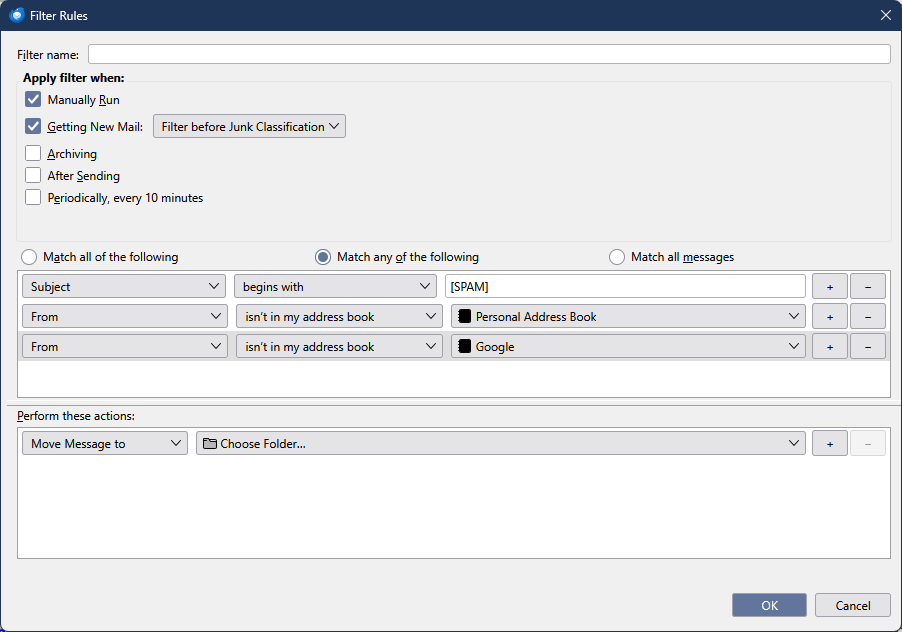
That's what I have done but then my address book would have to have every conceivable address @ every domain I want to receive from any address at those domains. If the address book could recognize *@domain.com that would solve it but what I read says that won't work. I even tried putting that in the address book but the rule still took [SPAM] emails as spam and didn't make an exception if the domain was one I tried making a wild card for in the address book. It doesn't recognize joe@domain.com as an address book address matching to *@domain.com
Create fake contacts with address fake@domain1.com, fake@domain2.com, fake@domain3.com .... and add rules From + doesn't contain + domain1.com, From + doesn't contain + domain2.com... to the previous picture.
I don't know of any other way to achieve your goal, unless you can define filters at the server level.
Modificat la de sfhowes
That's the brute force way, plus every time I start doing business with a new domain, even though it will get into my address book, I'll have to remember to update the rule. Kinda crazy. TBird just either needs to accept wild cards in the address book, or the list of rule options needs "the domain is in your address book".
Why not just keep the filter as in the picture, and when you receive mail from an allowed sender, add them to an address book by clicking the star next to their address in the header, twice, so the address is added to a chosen address book. This doesn't duplicate the effect of whitelisting a domain, but it's a quick way to build a set of allowed senders.