


Windows 10 reached EOS (end of support) on October 14, 2025. If you are on Windows 10, see this article.

Caută ajutor

Atenție la excrocheriile de asistență. Noi nu îți vom cere niciodată să suni sau să trimiți vreun SMS la vreun număr de telefon sau să dai informații personale. Te rugăm să raportezi activitățile suspecte folosind opțiunea „Raportează un abuz”.

Află mai multe
Arhivate

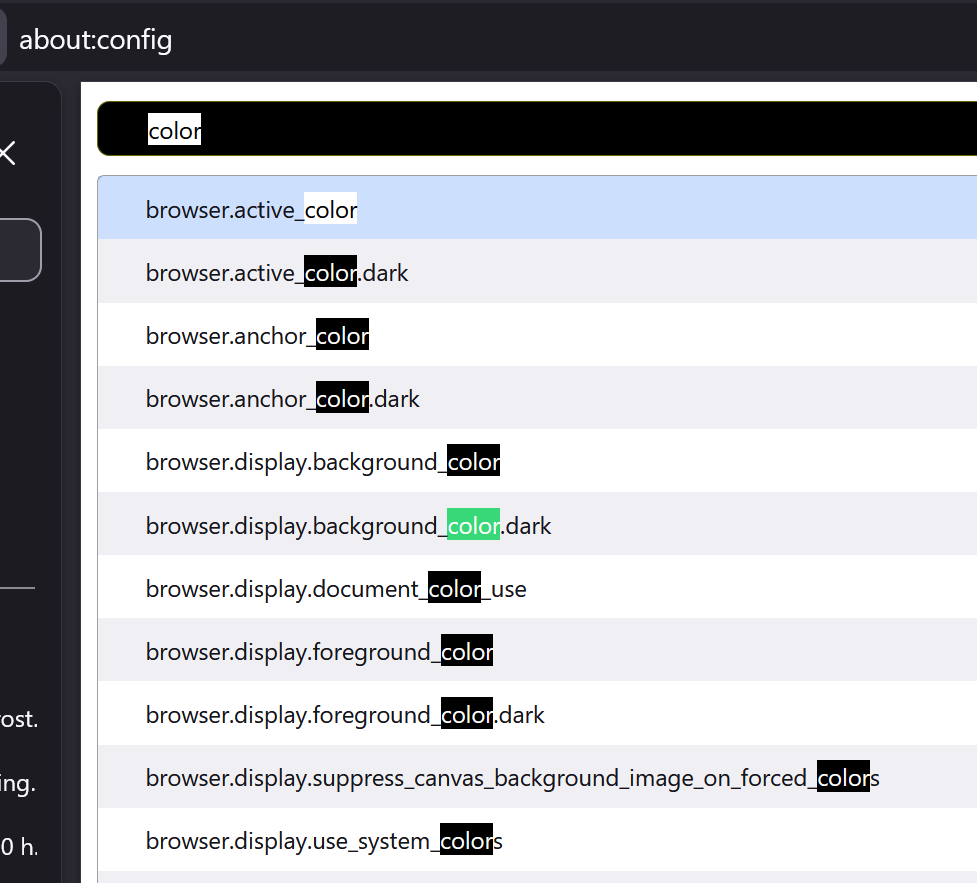
"Find" highlighted text background is really tough for this color blind person.

jonathan67

Doing a "find" ends up showing a greenish (so I'm told) background with white text. Want to guess which "find" in the attached image is difficult for me to find?

What I would like: Find (focus): yellow text on black background Find All: white text on black background

Yes, of course it would be nice if that would auto switch to black on yellow if the website default is black background.

I can hack userContent.css and get the selection function to work:

/* General highlight (for text selection, etc.) */

selection {
   background: #FFFF00 !important;  /* Yellow background */
   color: #000000 !important;       /* Black text */

}

I can hack userContent.css and get the Find All (sans the focus) to work.

But firefox always provides the focus with white on green. Even if I do something like this:

/* Customize the color of highlighted search text */ input[type="search"]:focus::selection {

   background: #FFFF00 !important;  /* Yellow background */
   color: #000000 !important;       /* Black text */

}

I tried several themes. No change. I tried changing Windows Preferences. No change.

There must be a way to make this "find" feature useful for me.
Doing a "find" ends up showing a greenish (so I'm told) background with white text. Want to guess which "find" in the attached image is difficult for me to find? What I would like: Find (focus): yellow text on black background Find All: white text on black background Yes, of course it would be nice if that would auto switch to black on yellow if the website default is black background. I can hack userContent.css and get the selection function to work: /* General highlight (for text selection, etc.) */ ::selection { background: #FFFF00 !important; /* Yellow background */ color: #000000 !important; /* Black text */ } I can hack userContent.css and get the Find All (sans the focus) to work. But firefox always provides the focus with white on green. Even if I do something like this: /* Customize the color of highlighted search text */ input[type="search"]:focus::selection { background: #FFFF00 !important; /* Yellow background */ color: #000000 !important; /* Black text */ } I tried several themes. No change. I tried changing Windows Preferences. No change. There must be a way to make this "find" feature useful for me.
Capturi de ecran atașate

Toate răspunsurile (1)

Go to about:config and type ui.text in the Search preference name textbox. It should give you 5 preferences that you can experiment with.

Modificat la de TyDraniu