


how to turn off bell notification dot?

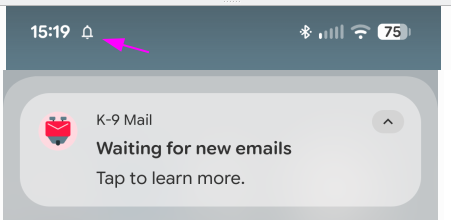
K9-mail User since 2010 Just had to reinstall to fix broken: empty folders. Now I have a bell icon in top margin (notification area) , who's sole purpose is to tell me mail client has a 'push' connection established the the server. I didn't need this bell to tell me that for the last 15 years, and don't want it now. I DO need PUSH, but don't want to see a bell telling me it's on. How to get rid of it? thank you
Toate răspunsurile (3)
This area of my screen is for notifications, that typically REQUIRE my attention. Notice it's empty except this bell. Google surely has at least a dozen other services maintaining long open network connections. Why does K9 need to tell us about theirs? If I want to know about them I'll run a NETSTAT app that shows me established network connections. I certainly don't want to see them in my notifications area.

Soluție aleasă
The following link might be helpful: Configure push email for Thunderbird for Android https://support.mozilla.org/en-US/kb/configure-push-email-thunderbird-android
Please see the following sections in the above link: 'The push email service notification' section → 'Hide, change or disable the push email service notification using “Configure notification”' section
thanks: fixed. Linked document makes clear: "New Email notifications are completely separate from the push email service notification" , which is not very clear in the App. Also seems at several points, settings I made years ago, were not mapped to new app settings, as I just had to turn off sync on nearly every folder across multiple accounts.