


Signature won't display above quoted Text

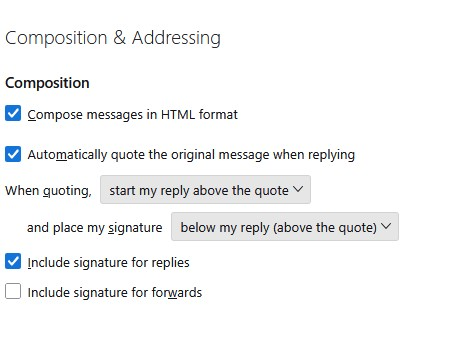
When I received my automatic upgrade to V141 64bit for windows 11, I can no longer put my default signature ABOVE the quoted text, even though it is set to do just that. It puts it below the quoted text.
Soluție aleasă
david said
Since I have never seen that problem, my guess is it is most likely either representing a corrupted install or possibly an addon interfering. My suggestion is to first try in troubleshooting mode and, if that fails, to download and install over the top of the installation.
Thanks, David. I took your suggestion and restarted Troubleshoot mode. When I restarted again and tested, the signature was on top of the quote where I want it to be. I wonder how long that will last.
Citește răspunsul în context 👍 0Toate răspunsurile (7)
Since I have never seen that problem, my guess is it is most likely either representing a corrupted install or possibly an addon interfering. My suggestion is to first try in troubleshooting mode and, if that fails, to download and install over the top of the installation.
It worked before.... That's the problem with TB. It's always something breaking, it seems. I was expecting it would become more stable, not less. Best solution for me - wait and see. I don't want to create more problems by trying to fix another. The response is appreciated though.
I've got beta 141.0b4
Identical settings to you and it works ok for me.
Is your signature in the 'Signature text' box or did you create the signature using Thunderbird, save as a html file and then select to 'attach the signature from a file instead' ?
Do you use the addon 'Signature Switch' ?
Modificat la de Toad-Hall
Toad-Hall said
I've got beta 141.0b4 Identical settings to you and it works ok for me. Is your signature in the 'Signature text' box or did you create the signature using Thunderbird, save as a html file and then select to 'attach the signature from a file instead' ? Do you use the addon 'Signature Switch' ?
Yes, I do use it but only turned it on yesterday while trying to find a cure. I will post the solution under David's response. Thank you.
Soluție aleasă
david said
Since I have never seen that problem, my guess is it is most likely either representing a corrupted install or possibly an addon interfering. My suggestion is to first try in troubleshooting mode and, if that fails, to download and install over the top of the installation.
Thanks, David. I took your suggestion and restarted Troubleshoot mode. When I restarted again and tested, the signature was on top of the quote where I want it to be. I wonder how long that will last.
I have 'Signature Switch' in a different version. I can tell you this, if you install the addon signature switch then when used it will put the signature below everything. It has always put signature below and this is a known issue which has been around for a long time. Using the Troubleshoot mode disables all addon extensions, so it should work as expected in that mode. This you have proved, but it's not the solution to a long term use. If you have a main signature set up in Thunderbird account settings then that will get used as expected providing you do not have 'Signature Switch' overriding. eg: If you use Signature Switch to operate a specific signature for specific email addresses. Then you can expect the signature to appear at the bottom of the entire email.
I 'solve' the issue for my personal mail by setting up multiple identities under the account pane. This lets me easily change sigs for the same account.