


Windows 10 reached EOS (end of support) on October 14, 2025. If you are on Windows 10, see this article.

Caută ajutor

Atenție la excrocheriile de asistență. Noi nu îți vom cere niciodată să suni sau să trimiți vreun SMS la vreun număr de telefon sau să dai informații personale. Te rugăm să raportezi activitățile suspecte folosind opțiunea „Raportează un abuz”.

Află mai multe

Sync Instructions Do Not Match Mobile Firefox Optioons

  • 1 răspuns
  • 10 au această problemă
  • 230 de vizualizări
  • Ultimul răspuns dat de jonzn4SUSE

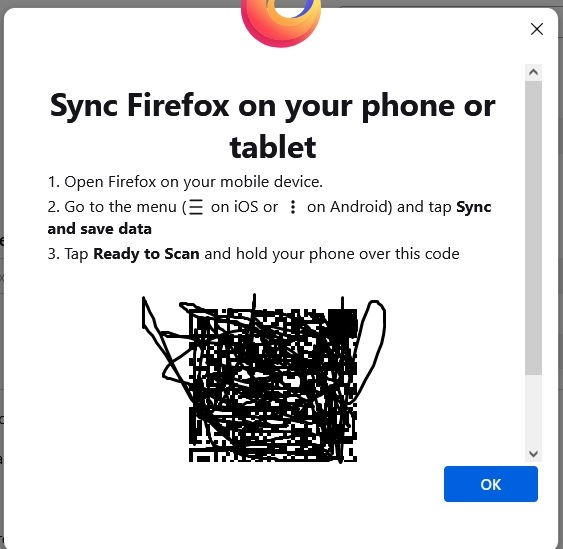
Hello, I am trying to sync browser bookmarks bidirectionally from PC to Cell devices. The instructional window that pops up on the PC says to: click the three dots in the Android Firefox cell, 1) Choose "I already have Firefox for mobile" & click Continue 2) Window popup appears "Sync Firefox on your phone or tablet" 2a) Open Firefox on cell phone 2b) Go to the Menu (three dots) 2c) Tap "Sync and save data" 2d) Tap "Ready to scan" My issue is, I do not see option 2c, Tap "Sync and save data. Thus, I cannot scan the OCR code to pair up the devices because in the Firefox app on the Android cell (Samsung Galaxy S22+), there is no option to sync and save data. Please advise. Thank you
Hello, I am trying to sync browser bookmarks bidirectionally from PC to Cell devices. The instructional window that pops up on the PC says to: click the three dots in the Android Firefox cell, 1) Choose "I already have Firefox for mobile" & click Continue 2) Window popup appears "Sync Firefox on your phone or tablet" 2a) Open Firefox on cell phone 2b) Go to the Menu (three dots) 2c) Tap "Sync and save data" 2d) Tap "Ready to scan" My issue is, I do not see option 2c, Tap "Sync and save data. Thus, I cannot scan the OCR code to pair up the devices because in the Firefox app on the Android cell (Samsung Galaxy S22+), there is no option to sync and save data. Please advise. Thank you
Capturi de ecran atașate

Toate răspunsurile (1)