


Windows 10 reached EOS (end of support) on October 14, 2025. If you are on Windows 10, see this article.

Caută ajutor

Atenție la excrocheriile de asistență. Noi nu îți vom cere niciodată să suni sau să trimiți vreun SMS la vreun număr de telefon sau să dai informații personale. Te rugăm să raportezi activitățile suspecte folosind opțiunea „Raportează un abuz”.

Află mai multe
Arhivate

Exporting from Otter.ai -

jscher2000 -... răspuns
mollyojsj

First of all, THANK YOU for volunteering. I've donated to Mozilla over the years and appreciate this product. Okay, here's my issue....I'm OLD! HA! Onto the pertinent issue I hope can be solved here:

I use Otter ai to transcribe my healing sessions w/ clients (I'm an energy healer-I see dimensions within the human energy field). I'm a "low-end" user (I just made that up) because it's just me. When I try (operative word) to export and actually hit the "export" button, I get this stupid, crappy, dangling box about ChatGPT (see image below). There's no place to respond yes, no, or to close it out. The only thing I can do is hit "escape" to make it disappear but then I'm kicked out of the export process to view the original screen listing my recent meetings.

Specifics: I have a Macbook Air, macOS Sonoma version 14.4.1 w/ an Apple M1 (no idea what all this but assume it's useful for you). FF is my default browser. I use otter thru FF rather than an app on my Mac. In FF settings I've added otter ai to a list that allows website popups. I don't use Chatgpt or whatever it does on otter. I just want to export the text.

Sadly, otter ai customer support has been dismal. So, I've turned to you folks. I'm not super computer savvy, but hope I've done the basics to rule out issues. Oh, I've also logged out then in to Otter, rebooted my laptop a bunch- all the things to reset. Didn't work.

Thank you for your help!!!! Molly
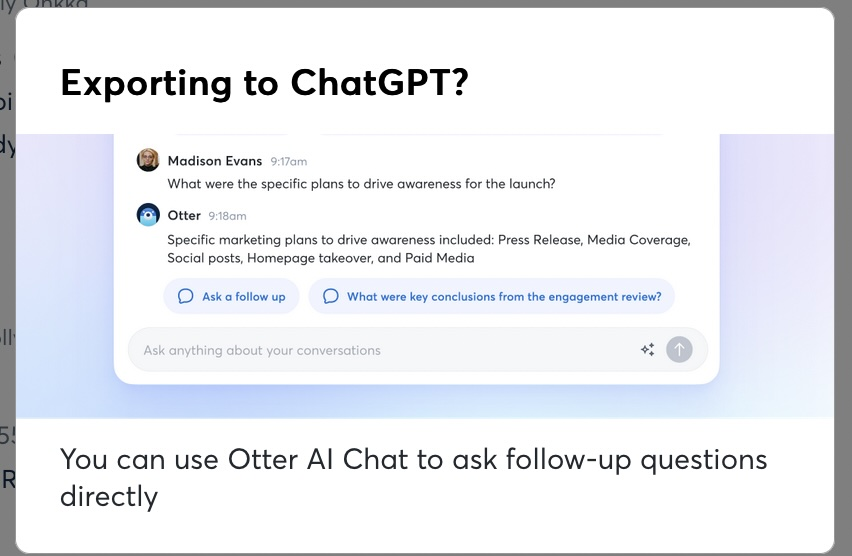
First of all, THANK YOU for volunteering. I've donated to Mozilla over the years and appreciate this product. Okay, here's my issue....I'm OLD! HA! Onto the pertinent issue I hope can be solved here: I use Otter ai to transcribe my healing sessions w/ clients (I'm an energy healer-I see dimensions within the human energy field). I'm a "low-end" user (I just made that up) because it's just me. When I try (operative word) to export and actually hit the "export" button, I get this stupid, crappy, dangling box about ChatGPT (see image below). There's no place to respond yes, no, or to close it out. The only thing I can do is hit "escape" to make it disappear but then I'm kicked out of the export process to view the original screen listing my recent meetings. Specifics: I have a Macbook Air, macOS Sonoma version 14.4.1 w/ an Apple M1 (no idea what all this but assume it's useful for you). FF is my default browser. I use otter thru FF rather than an app on my Mac. In FF settings I've added otter ai to a list that allows website popups. I don't use Chatgpt or whatever it does on otter. I just want to export the text. Sadly, otter ai customer support has been dismal. So, I've turned to you folks. I'm not super computer savvy, but hope I've done the basics to rule out issues. Oh, I've also logged out then in to Otter, rebooted my laptop a bunch- all the things to reset. Didn't work. Thank you for your help!!!! Molly
Capturi de ecran atașate

Toate răspunsurile (1)

Hi Molly, they don't mention that on their help page:

https://help.otter.ai/hc/en-us/articles/360047733634-Export-conversations

One thing I wonder is whether a close button (X) is missing for that message. Maybe because of the zoom level or some other factor, the button is cut off. Just a guess.

Could you test what it looks like in Safari?