


Windows 10 reached EOS (end of support) on October 14, 2025. For more information, see this article.

Caută ajutor

Atenție la excrocheriile de asistență. Noi nu îți vom cere niciodată să suni sau să trimiți vreun SMS la vreun număr de telefon sau să dai informații personale. Te rugăm să raportezi activitățile suspecte folosind opțiunea „Raportează un abuz”.

Află mai multe

Can't pin extensions to the toolbar using the extension button

  • 1 răspuns
  • 2 au această problemă
  • 1590 de vizualizări
  • Ultimul răspuns dat de maria lopez

mai multe opțiuni

Hello folks

According to Firefox help pages, pinning an extension to the toolbar should work as follows:

"Click the extensions button (jigsaw puzzle Fx109ExtensionsButton icon) in the toolbar to open the extensions panel. Each extension in the panel has a menu button with a gear Fx91GearIcon icon. You can use this menu button to manage those extensions."

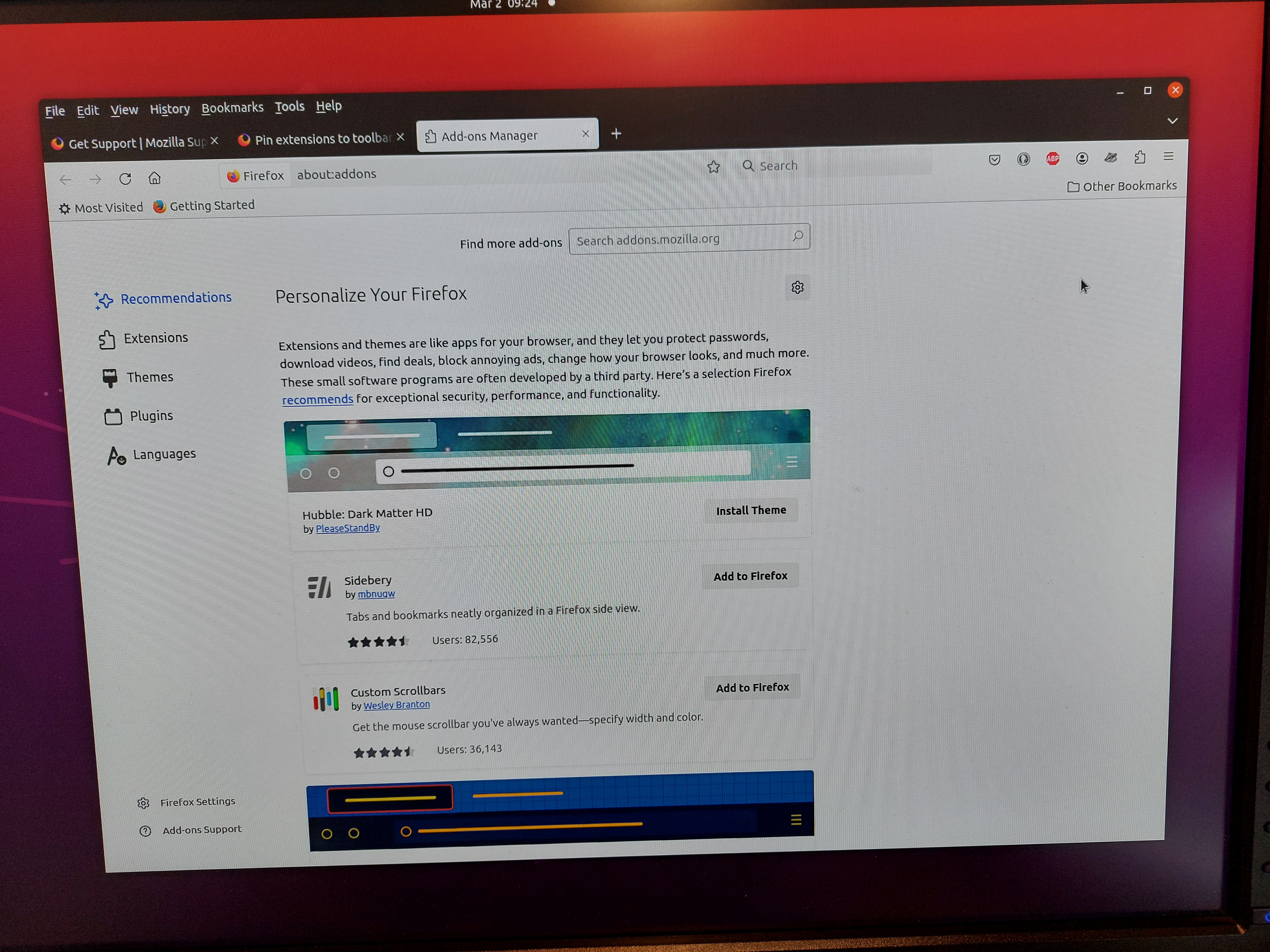
The extensions button doesn't seem to work like that for me. When I click the Extensions button I get several buttons (Recommendations, Extensions etc) on the left side of the page as in the first image attached (Firefox1).

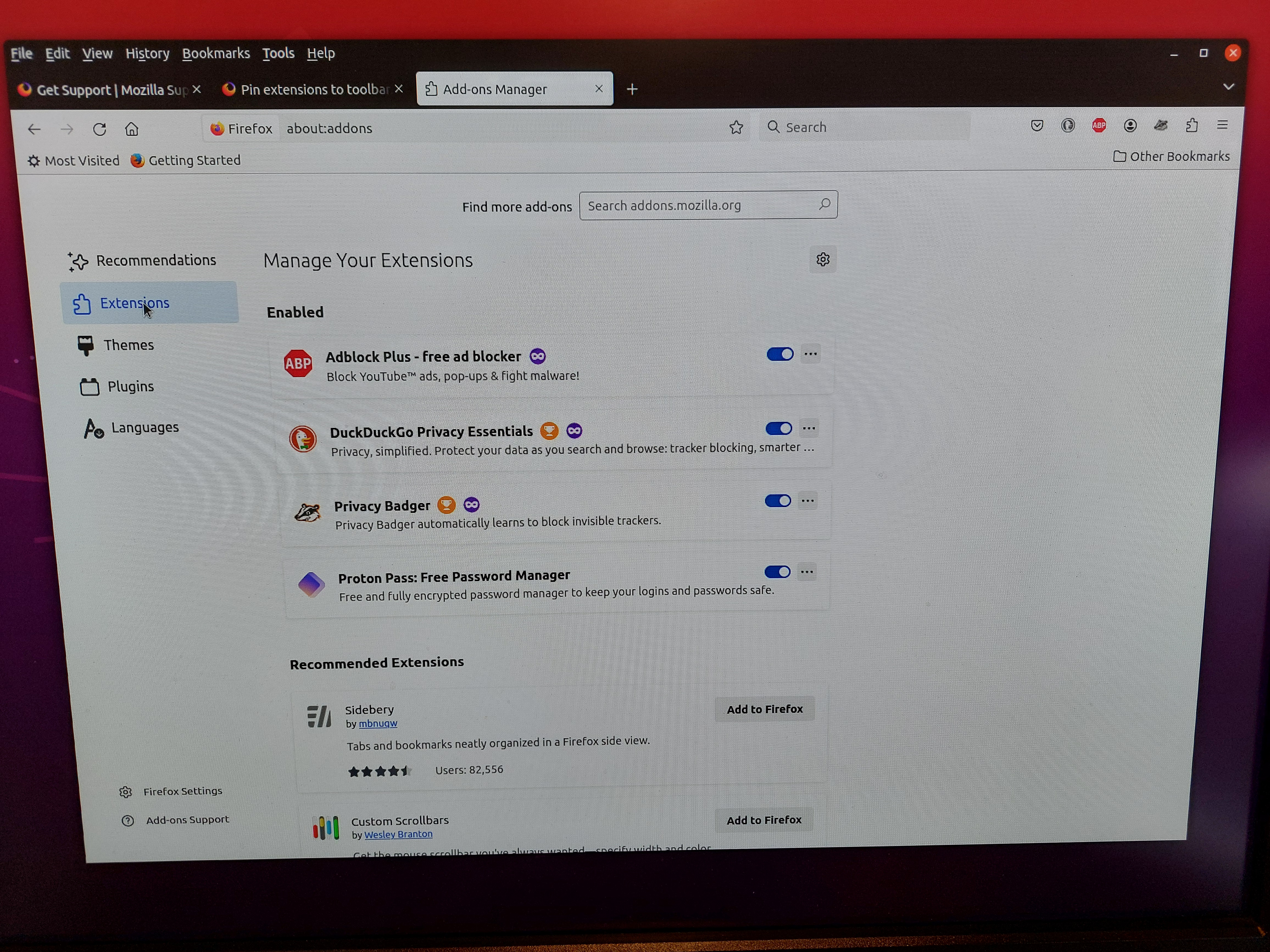
If I then click the Extensions button I get to the Manage Extensions page, and if I then click the 3 dots (...) button on (say) Proton Pass I don't get a Pin to Toolbar option and clicking the Manage option opens the Proton Pass Details page (see image Firefox2) - none of the buttons on the any of the pages offers a Pin to Toolbar option.

Those extensions that are pinned to the toolbar, such as Adblock Plus ( see Firefox2 image), got pinned during installation and not by using the extensions button. Currently I seem to have no way of interacting with any extension via the extensions button.

Could be I'm doing something silly but any suggestions would be appreciated.

Regards Ken
Hello folks According to Firefox help pages, pinning an extension to the toolbar should work as follows: "Click the extensions button (jigsaw puzzle Fx109ExtensionsButton icon) in the toolbar to open the extensions panel. Each extension in the panel has a menu button with a gear Fx91GearIcon icon. You can use this menu button to manage those extensions." The extensions button doesn't seem to work like that for me. When I click the Extensions button I get several buttons (Recommendations, Extensions etc) on the left side of the page as in the first image attached (Firefox1). If I then click the Extensions button I get to the Manage Extensions page, and if I then click the 3 dots (...) button on (say) Proton Pass I don't get a Pin to Toolbar option and clicking the Manage option opens the Proton Pass Details page (see image Firefox2) - none of the buttons on the any of the pages offers a Pin to Toolbar option. Those extensions that are pinned to the toolbar, such as Adblock Plus ( see Firefox2 image), got pinned during installation and not by using the extensions button. Currently I seem to have no way of interacting with any extension via the extensions button. Could be I'm doing something silly but any suggestions would be appreciated. Regards Ken
Capturi de ecran atașate

Soluție aleasă

Hi Ken, the button will load the Add-ons page if there is nothing on the drop-down list.

it looks like your first three extensions are already pinned to the toolbar. When you do that, they no longer appear on the drop-down.

So the question is why the fourth extension doesn't appear on the drop-down. I'm going to speculate here...

The only thing I notice is that it doesn't have the mask icon indicating that it is allowed to run in private windows. More info on that issue: Extensions in Private Browsing. Maybe you are browsing Firefox in a private window ("Never Remember History" mode)?

Citește răspunsul în context 👍 3

Toate răspunsurile (1)

mai multe opțiuni

Soluție aleasă

Hi Ken, the button will load the Add-ons page if there is nothing on the drop-down list.

it looks like your first three extensions are already pinned to the toolbar. When you do that, they no longer appear on the drop-down.

So the question is why the fourth extension doesn't appear on the drop-down. I'm going to speculate here...

The only thing I notice is that it doesn't have the mask icon indicating that it is allowed to run in private windows. More info on that issue: Extensions in Private Browsing. Maybe you are browsing Firefox in a private window ("Never Remember History" mode)?