


Windows 10 reached EOS (end of support) on October 14, 2025. If you are on Windows 10, see this article.

Caută ajutor

Atenție la excrocheriile de asistență. Noi nu îți vom cere niciodată să suni sau să trimiți vreun SMS la vreun număr de telefon sau să dai informații personale. Te rugăm să raportezi activitățile suspecte folosind opțiunea „Raportează un abuz”.

Află mai multe

keyboard shortcut to display a PDF file in two-page view in Firefox.

  • 1 răspuns
  • 1 are această problemă
  • 242 de vizualizări
  • Ultimul răspuns dat de zeroknight
  • Arhivate

Dear Mozilla Firefox Support Team,

I am writing to inquire about the keyboard shortcut to display a PDF file in two-page view in Firefox. I have searched through the Firefox keyboard shortcuts documentation, but I have not been able to find this information.

I frequently view PDF files in Firefox, and I would find it very convenient to be able to switch to two-page view with a keyboard shortcut. This would save me time and effort from having to click on the two-page view button in the PDF viewer toolbar.

I would be grateful if you could provide me with the keyboard shortcut for two-page view in Firefox. If there is no such shortcut, I would also be interested to know if there is any way to create a custom keyboard shortcut for this task.


Details of Browser I'm Using Mozilla Firefox 115.0 windows
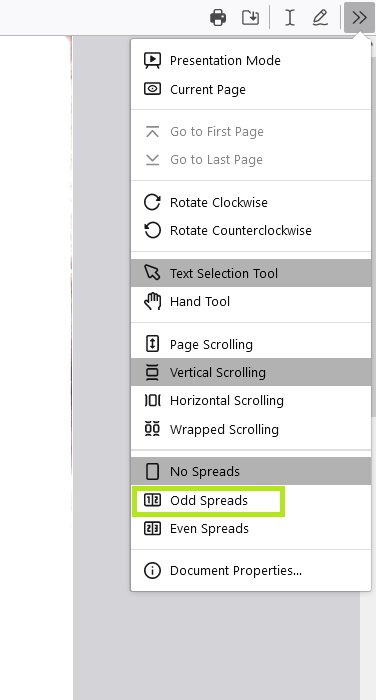
Dear Mozilla Firefox Support Team, I am writing to inquire about the keyboard shortcut to display a PDF file in two-page view in Firefox. I have searched through the Firefox keyboard shortcuts documentation, but I have not been able to find this information. I frequently view PDF files in Firefox, and I would find it very convenient to be able to switch to two-page view with a keyboard shortcut. This would save me time and effort from having to click on the two-page view button in the PDF viewer toolbar. I would be grateful if you could provide me with the keyboard shortcut for two-page view in Firefox. If there is no such shortcut, I would also be interested to know if there is any way to create a custom keyboard shortcut for this task. Details of Browser I'm Using Mozilla Firefox 115.0 windows
Capturi de ecran atașate

Toate răspunsurile (1)

You can make the spread view default by going to about:config in the address bar and changing pdfjs.spreadModeOnLoad to 1.