

Windows 10 reached EOS (end of support) on October 14, 2025. If you are on Windows 10, see this article.

Caută ajutor

Atenție la excrocheriile de asistență. Noi nu îți vom cere niciodată să suni sau să trimiți vreun SMS la vreun număr de telefon sau să dai informații personale. Te rugăm să raportezi activitățile suspecte folosind opțiunea „Raportează un abuz”.

Află mai multe
Arhivate

Thunderbird outgoing server problem

compusafe

I have 5 gmail accounts, each for a separate purpose. 2 accounts are working fine. 3 others have this problem. I'll call them a@gmail.com, b@gmail.com, c@gmail.com

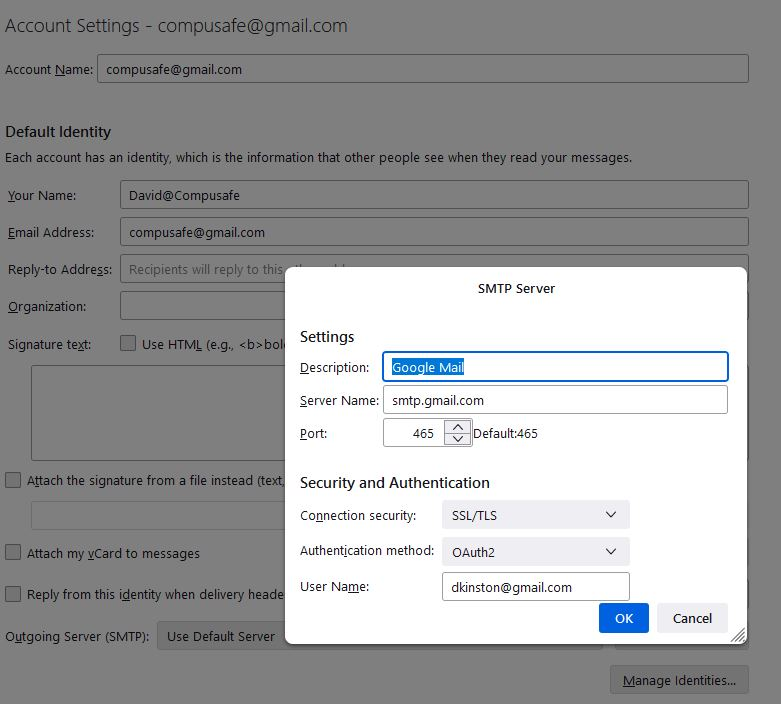
When I configure the outgoing server ('edit smtp server'), there is a field for the user name, which is the email address, and the recipient sees this email address as the sender. Problem - with a, b and c - they all contain the same email address! So if I enter a@gmail.com for a, this is immediately replicated for b and c. So when I send email using c@gmail.com, it arrives as an email from a@gmail.com. This does not affect the other 2 accounts, which retain the correct settings.

There must be a setting somewhere - any ideas? My email is dkinston@gmail.com. If you know the answer - please email me!
I have 5 gmail accounts, each for a separate purpose. 2 accounts are working fine. 3 others have this problem. I'll call them a@gmail.com, b@gmail.com, c@gmail.com When I configure the outgoing server ('edit smtp server'), there is a field for the user name, which is the email address, and the recipient sees this email address as the sender. Problem - with a, b and c - they all contain the same email address! So if I enter a@gmail.com for a, this is immediately replicated for b and c. So when I send email using c@gmail.com, it arrives as an email from a@gmail.com. This does not affect the other 2 accounts, which retain the correct settings. There must be a setting somewhere - any ideas? My email is dkinston@gmail.com. If you know the answer - please email me!
Capturi de ecran atașate

Toate răspunsurile (1)