


Windows 10 reached EOS (end of support) on October 14, 2025. If you are on Windows 10, see this article.

Caută ajutor

Atenție la excrocheriile de asistență. Noi nu îți vom cere niciodată să suni sau să trimiți vreun SMS la vreun număr de telefon sau să dai informații personale. Te rugăm să raportezi activitățile suspecte folosind opțiunea „Raportează un abuz”.

Află mai multe
Arhivate

error while creating logins to be saved - using latest firefox on mac

ramon628

i use firefox on both my desktop (windows) and laptop (macbook). I try to sync the 2 so that the logins (passwords saved) on firefox desktop but although i am logged in and synced in firefox macbook (bookmarks have been synced) the saved logins dont. The firefox macbook saved logins are empty. I tried exporting them in csv from the desktop and import them in macbook but it shows an error. i even tried to manually save a login in macbook (in the lockwise section of logins) and still shows an error.

thanks
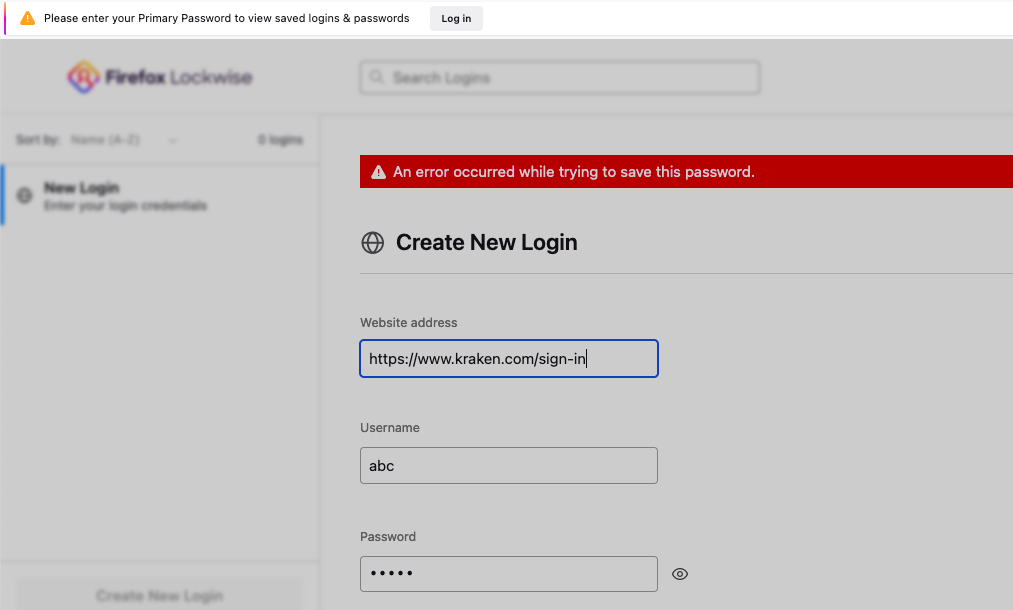
i use firefox on both my desktop (windows) and laptop (macbook). I try to sync the 2 so that the logins (passwords saved) on firefox desktop but although i am logged in and synced in firefox macbook (bookmarks have been synced) the saved logins dont. The firefox macbook saved logins are empty. I tried exporting them in csv from the desktop and import them in macbook but it shows an error. i even tried to manually save a login in macbook (in the lockwise section of logins) and still shows an error. thanks
Capturi de ecran atașate

Toate răspunsurile (2)

Do any of the profiles use the Master Password? If so, disable it. Are you using a password manager other than what came with the browser?

Looks like you canceled a prompt to enter the Primary Password, doing that locks the Password Manager and you need to re-enter the Primary Password to unlock the passwords.