


why is my attachments inline? why can't i download them?

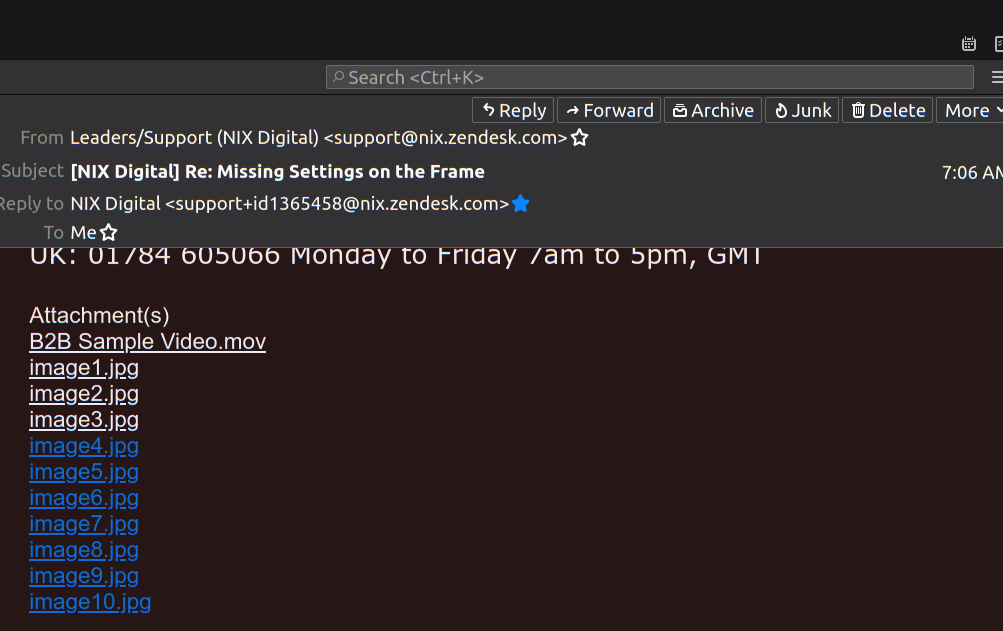
recently i could see files sent to me from this same company as attachments. since the last update from thunderbird via mint 20 attachments are now inline and no option to download or save to a location of my choosing. right click only says save as link or select all which grabs the entire email. so it wants to save a .jpg or .mov as .mov.html or .jpg.html and they only opened in my browser. i need to move the files 10 in all to an sd card to check if the picture frame i'm using works correctly.
Soluție aleasă
The 'attachments' in your picture are not really attachments to the message, but are links to files posted on a web server - which is why they are underlined. Plus, they appear to not be direct links to the jpg files, but rather links to html files on the web server that contain the jpg files. There is really no way to download them like normal attachments in TB - you have to open the links in a browser and then save the jpg files.
Citește răspunsul în context 👍 0Toate răspunsurile (2)
Soluție aleasă
The 'attachments' in your picture are not really attachments to the message, but are links to files posted on a web server - which is why they are underlined. Plus, they appear to not be direct links to the jpg files, but rather links to html files on the web server that contain the jpg files. There is really no way to download them like normal attachments in TB - you have to open the links in a browser and then save the jpg files.
Thanks for your reply that helps to make more sense, the second half of the issue was if i saved the files it saves as .htm. i needed .jpg files to put on a sd card to check if a pic frame was playing correctly. when saving the files i didn't know what to do with the .htm files. I had a local group leader that said just change all the extensions to .jpg. I said that's all there is to it? Seems he was right, they work fine. I had no idea they could be changed this way. This issue is solved