


Why do I get "sending request to www.facebook.com" in apparently unrelated pages?

I was using this site https://donativos.unicef.pt/criancas-refugiadas/?utm_term=Amigos+da+UNICEF%3A+Mostre+que+nao+se+esqueceu&utm_campaign=Siria+9+Anos&utm_source=e-goi&utm_medium=email, but I've seen this happening in other sites, and after submitting a form I got "Sending request to www.facebook.com" in the bottom bar.
What does it mean? Is this some kind of tracking?
Soluție aleasă
Yes, if you only block trackers in PB mode then you will still see them in a regular window. You can always click the shield and disable TP is you notice issues with TP blocking essential content.
Toate răspunsurile (9)
I do see a Facebook item at the very bottom of the page that likely causes this. I had to disable Tracking Protection, because TP blocks such social media trackers.
Yes, I also have Tracking Protection enabled, nevertheless I saw that request.
What Facebook requests do you see in the Network Monitor ?
- "3-bar" menu button or Tools -> Web Developer
If necessary use "Ctrl+F5" or "Ctrl+Shift+R" (Mac: Command+Shift+R) to reload the page and bypass the cache to generate a fresh log.
After clicking "Quero ajudar" and filling-in some data I get the requests in the attached image.
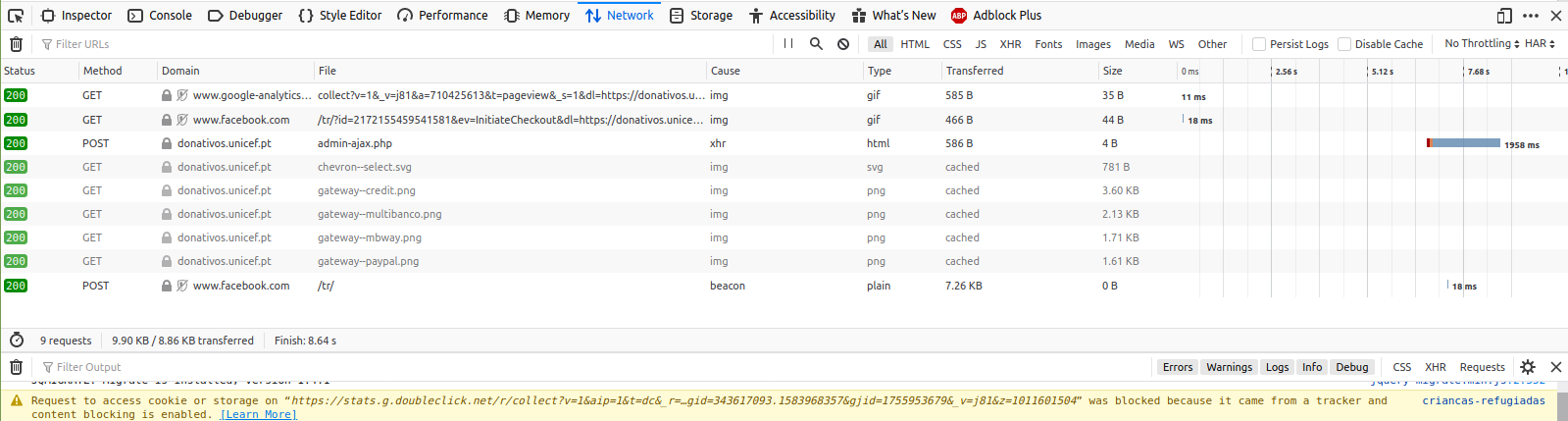
I see a disabled Tracking Protection icon next to some requests that indicate that you disabled Tracking Protection for this website (host).
What do you see if you click the shield icon on the location bar ?
You appear to be using Firefox from the Ubuntu repositories and I don't know whether TP works differently in this version.
In fact, under the shield I see "Not Blocking Tracking Content". But then clicking on "Manage Protection Settings" I see I'm using the Standard option.
You have Adblock Plus as well, so this extensioncouldblock content as well or otherwise interfering.
What happens if you use the custom setting for TP and include social media websites or unvisited third-party websites ?
Adblock Plus does not seem to influence---I've disabled it to check.
Using custom I had to choose "In all windows", otherwise the default is to not track only in private windows. I think that might be the reason?
Modificat la de João M. S. Silva
Soluție aleasă
Yes, if you only block trackers in PB mode then you will still see them in a regular window. You can always click the shield and disable TP is you notice issues with TP blocking essential content.