


Having "Calendar updates issues with Thunderbird" and don't see a config editor to resolve

The topic for "Calendar updates issues with Thunderbird" (https://support.mozilla.org/en-US/kb/calendar-updates-issues-thunderbird) is well described, but does not work for me (Ubuntu 18.04.01 LTS, Thunderbird 60.2.1, Lightning 5.4) as I don't see a config editor? Is there a shell option to start TB's config editor? At least I could not find one via thunderbird -h. Currently Lightning is deactivated due to incompatibility. Many thanks already reading and hopefully help. Regards, Christian
Toate răspunsurile (3)
The config editor is accessed from;
Linux Edit > preferences > Advanced > general.
Windows Tools > options > Advanced > General
OSX Thunderbird > preferences > advanced > general.
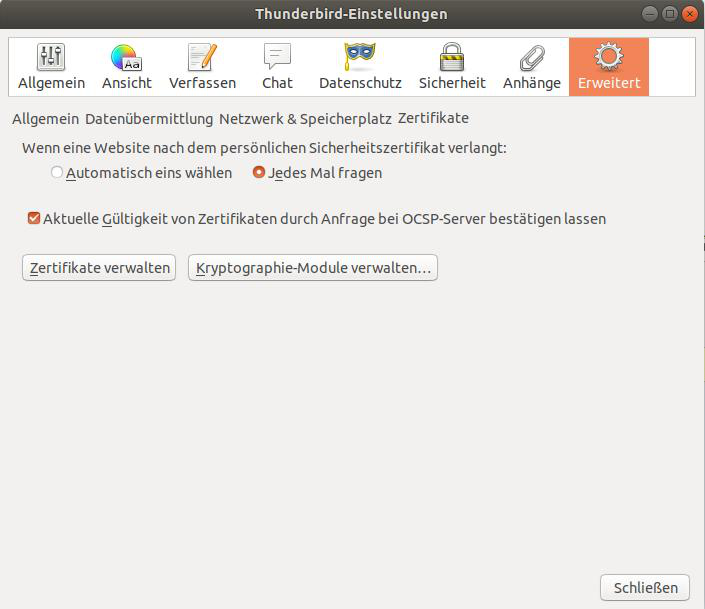
Thank you Matt, but unfortunately there is no general below advanced in my case. Saw on screenshots that their shall be sub menues, but my TB does not show them at all?! See my screenshot attached. Even if it shows a German menu, you can get my issue.
sfhowes said
If you click on the word Allgemein next to 'Datenubermittlung' you should see the Config. editor button. This is a problem with some versions of Linux.
... great, feels like back in the times of Monkey Island .. found the secret config editor, but did not help as you already considered.
Fortunately the second part
Even if you can open Config. editor, the fix described in the article may not work. If so, try this instead.
of your answer did solve my issue! Many many thanks sfhowes!